How WhatsApp works, from registration to read receipts
WhatsApp is a messaging app that sends messages over your internet connection instead of the carrier's SMS network, using your phone number as the account. You install it, verify the number with a six-digit code, and your existing contacts who also use it appear automatically. Everything after that — chats, calls, groups, photos — runs on data and is end-to-end encrypted by default.

Key takeaways
- Your phone number is the account. There is no username, no password and no friend request step.
- The tick system is the thing people misread most: one tick is sent, two is delivered, two blue is read.
- Calls run over the internet, so they use data rather than minutes and never appear as itemised calls on a bill.
- Chats live on your phone, not on WhatsApp's servers. Without a backup, losing the phone loses the history.
The one idea that explains the rest
WhatsApp replaced SMS by moving messaging onto the internet. An SMS goes through your mobile operator, is metered by them, and costs money per message in many countries. A WhatsApp message goes over your data connection to WhatsApp's servers and on to the recipient, costing a fraction of a penny in data and nothing in fees.
Almost every difference between the two follows from that. WhatsApp needs an internet connection where SMS does not. It can send photos, video and voice notes where SMS effectively cannot. It can tell you when a message was delivered and read, because the app at the other end can report back. And it is encrypted end to end, which SMS never was.
Setting it up
From installation to first message
- Install the appFrom the App Store on iPhone or Google Play on Android. Only install from the official store — cloned versions carrying malware are a real problem, particularly for Android.
- Enter your phone numberIn full international format, country code first and no leading zero. This number becomes your account.
- Enter the six-digit codeIt arrives by SMS within seconds. If it does not, wait for the countdown and use 'Call me'. See what the six-digit code is — and never share it with anyone.
- Allow contact access, or decline itAllowing it lets WhatsApp match your phone book against its users so contacts appear automatically. Declining it means adding people manually by number, which works but is laborious.
- Set a name and photoThe name you enter here is what appears in groups to people who have not saved you. Changing it later is covered in changing your WhatsApp name.
- Turn on two-step verificationSettings → Account → Two-step verification. Do this now rather than later; it is the single most useful thing on this list.
The tick system, decoded
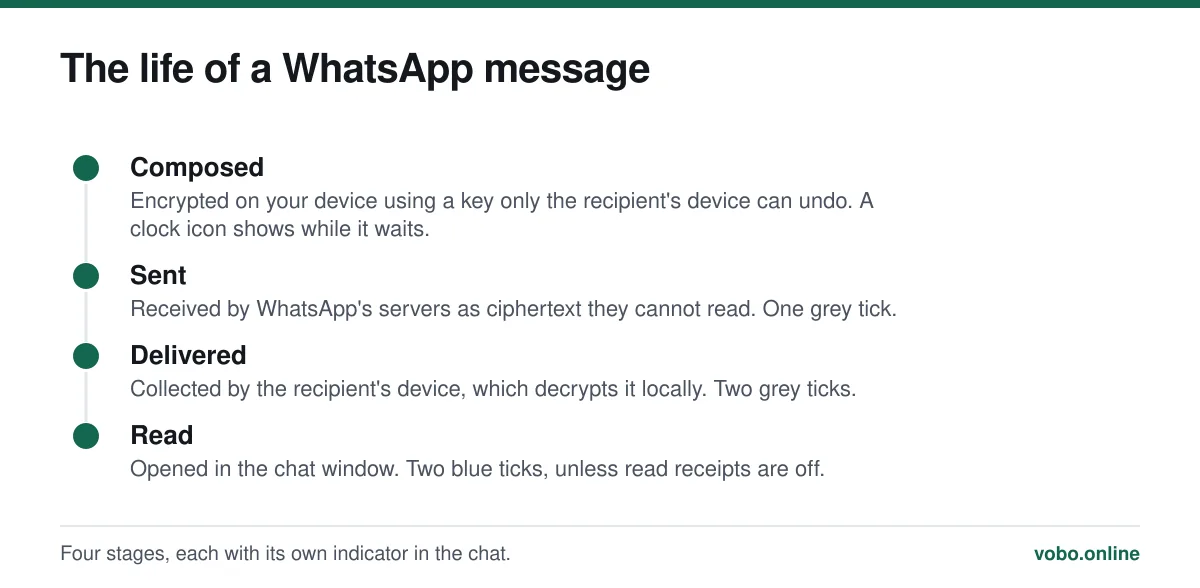
This is the most misread interface element on the platform, and misreading it causes real arguments.
| Indicator | Means | Does not mean |
|---|---|---|
| Clock icon | The message has not left your phone — you have no connection | Anything about the recipient |
| One grey tick | WhatsApp's servers have it; the recipient's device has not collected it | That you are blocked, though blocking produces the same icon |
| Two grey ticks | It reached their phone | That they have seen it or opened the app |
| Two blue ticks | It was opened in the chat | That they read it carefully, or that they will reply |
| Two grey ticks that never turn blue | They may have read receipts switched off | That they are ignoring you |
The two rows on the right-hand column are where the trouble lives. A single grey tick almost always means the other phone is off, out of signal, or has WhatsApp force-stopped. It can also mean you have been blocked, and there is no way to distinguish the two from the outside. Anyone offering a reliable test for blocking is guessing. This is unpacked properly in why WhatsApp messages are not delivering.
Everyday messaging
The basics are conventional: tap a chat, type, send. The parts worth knowing about are the ones that are not obvious from the interface.
- Reply to a specific message by swiping right on it, which quotes it above your reply. In a busy group this is the difference between a conversation and a mess.
- Long-press a message to edit it within 15 minutes of sending, or to delete it for everyone within about two days. The recipient sees that something was deleted, which is unavoidable.
- Hold the microphone icon to record a voice note, or slide it up to lock recording so you can stop holding it.
- Pin an important chat to the top of the list by long-pressing it. Up to three.
- Archive a chat to hide it without deleting it. Archived chats stay silent unless you change that setting.
Calls
Voice and video calls run over the same data connection as messages. They use no minutes, cost nothing beyond the data, and are end-to-end encrypted like everything else. A voice call consumes roughly 300 KB per minute; video is around ten times that. The numbers and how to reduce them are in does WhatsApp work without Wi-Fi.
Because they are not carrier calls, they never appear as itemised entries on a phone bill — only as data. That specific question is answered in do WhatsApp calls show on your phone bill.
Groups, communities and channels
| Type | Who can post | Member visibility | Typical use |
|---|---|---|---|
| Group | Everyone, unless admins restrict it | All members see each other's numbers | Family, friends, a team |
| Community | Announcement group is admin-only | Announcement members are hidden from each other | A school or club with several sub-groups |
| Channel | Admin only; followers cannot reply | Followers are anonymous to everyone | Broadcast updates to strangers |
Where your chats actually live
On your phone. This surprises people who assume messages sit in the cloud like email. WhatsApp's servers hold a message only until it is delivered, then discard it. The permanent copy is the one on your device.
That is why backups matter more here than in most apps. WhatsApp can back up to iCloud on iPhone or Google Drive on Android, daily if you set it to. Without a backup, a lost or wiped phone loses the history permanently — there is no server-side copy for anyone to restore.
Turn on end-to-end encrypted backup under Settings → Chats → Chat backup. Without it the backup is protected only by your Apple or Google account password, which is a weaker guarantee than the chats themselves have.
Using it on more than one device
You can link up to four companion devices to one account — a computer via web.whatsapp.com or the desktop app, a tablet, or a second phone. Since 2023 they work even when the primary phone is switched off, which was a real limitation before.
Linking is done by scanning a QR code, and that mechanism is also the basis of a common account-theft scam, so it is worth understanding what you are scanning: scanning a WhatsApp QR code. Audit the list occasionally at Settings → Linked devices and log out anything you do not recognise.
Frequently asked questions
Is WhatsApp free to use?
The app costs nothing and there are no per-message or per-minute charges. It uses your internet connection, so it consumes data from your mobile allowance when you are not on Wi-Fi. The old $0.99 annual subscription was dropped in 2016.
Do both people need WhatsApp?
Yes. It only sends messages to other WhatsApp accounts — it cannot send an SMS to someone who does not have it. If a contact does not appear in the app, they are not registered on that number.
Can I use WhatsApp on a computer?
Yes, through web.whatsapp.com or the desktop app, linked to your account by QR code. It counts as one of your four companion devices and works when your phone is offline.
What happens to my messages if I delete the app?
Deleting the app leaves the account registered but removes the local chat database. Reinstalling and re-verifying restores from your most recent backup. If backups were switched off, the history is gone for good — nobody has a server-side copy.
Sources
- About message information — WhatsApp Help CenterSupports: The exact meaning of one tick, two ticks and blue ticks, and that group read receipts cannot be disabled.
- About backing up your chat history — WhatsApp Help CenterSupports: That chat history is stored on the device and that restoring depends on an iCloud or Google Drive backup.
- How to use WhatsApp on linked devices — WhatsApp Help CenterSupports: The four-device limit and that companion devices operate independently of the primary phone.
Related reading

Setup and account
How to create a WhatsApp account, step by step
Setting up WhatsApp takes about three minutes. Here is the whole process on iPhone and Android, plus the two settings worth changing immediately.
Troubleshooting
Why WhatsApp messages are not delivering: the seven real causes
One tick means the message reached WhatsApp but not the recipient's phone. Here are the seven causes, ranked by how common they actually are.
Calls, data and cost
Does WhatsApp work without Wi-Fi? Yes — and here is what it costs
WhatsApp works on mobile data with no Wi-Fi at all. This explains what it needs, how much data messages and calls actually use, and what breaks offline.
Features explained
How to scan a WhatsApp QR code, and the scam that abuses it
WhatsApp uses QR codes for two different jobs: adding a contact and linking a device. Here is how to scan each, and why one of them is dangerous.