How to scan a WhatsApp QR code, and the scam that abuses it
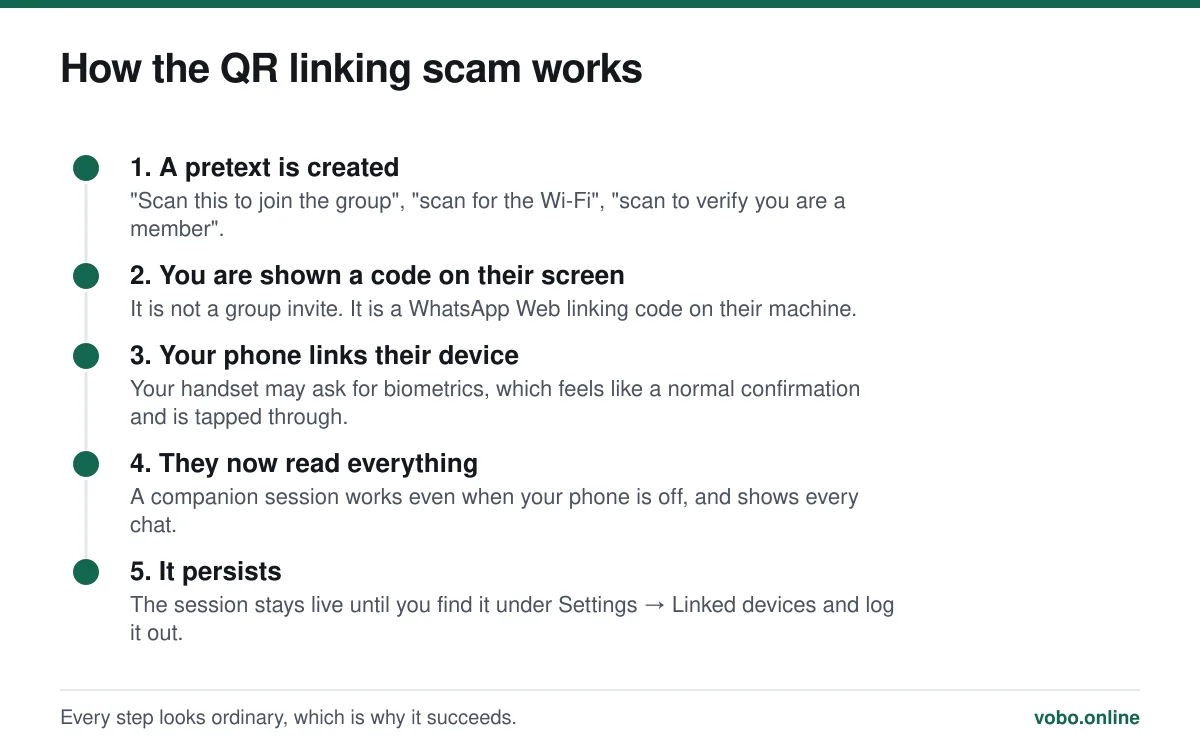
Open WhatsApp, go to Settings, tap the QR icon next to your name, and switch to the Scan tab — that adds a contact. To link a computer or tablet instead, use Settings → Linked devices → Link a device, which opens a scanner for the code on the other screen. The second one grants full access to your messages, so never scan a linking code that somebody else has shown you.
Key takeaways
- Two different QR codes exist: contact codes, which are harmless, and device-linking codes, which are not.
- Scanning someone else's linking QR gives them a live session on your account, reading everything.
- Contact QR codes can be reset at any time, which invalidates every copy already shared.
- Audit Settings → Linked devices occasionally. Companion sessions work even when your phone is off.
The two codes are not the same thing
This distinction is the whole article, and confusing the two is how people lose their accounts.
| Contact QR | Device-linking QR | |
|---|---|---|
| Where it lives | Settings → your name → QR icon | web.whatsapp.com or the desktop app |
| What scanning does | Adds that person to your contacts | Grants a device full access to your account |
| Who should scan it | Anyone you want to swap numbers with | Only you, on a screen you control |
| Risk if misused | They get your phone number, which they would anyway | They read all your messages, indefinitely |
| Reversible | Reset the code at any time | Log the device out at Settings → Linked devices |
Scanning a contact QR code
Adding a contact by QR
- Open Settings and tap your nameAndroid: three-dot menu → Settings, then your profile row. iPhone: the Settings tab, then your name at the top.
- Tap the QR icon beside your nameYou get two tabs: 'My code', which shows yours, and 'Scan code', which opens the camera.
- Switch to 'Scan code' and point at theirsIt detects automatically; there is no shutter button. Grant camera permission if prompted.
- Confirm the contactWhatsApp shows the name and number and offers to add them. Nothing is saved until you confirm.
The advantage over typing digits is that it cannot be mistyped, and it handles international formats correctly — a common source of contacts that never appear, discussed in using WhatsApp internationally.
Resetting your contact code
Your contact QR encodes a link to your account. If you have printed it, put it on a poster or shared it more widely than you meant to, you can invalidate every existing copy.
Open the QR screen, tap the three-dot menu, and choose Reset QR code. Old codes stop working immediately. Note what this does not do: it does not hide your phone number, which is visible to anyone you have ever messaged regardless — see does WhatsApp show your phone number.
Linking a computer or tablet
Linking a device the right way
- Open web.whatsapp.com on the computerOr open the WhatsApp desktop app. A QR code appears on that screen. Make sure it is genuinely web.whatsapp.com — phishing pages imitating this screen exist.
- On your phone, open Settings → Linked devicesOn iPhone this is in the Settings tab; on Android it is under the three-dot menu.
- Tap 'Link a device'Your phone may ask for your fingerprint, face or passcode first. That prompt is a safeguard, not an obstacle.
- Point the phone at the code on the computer screenIt links within a second or two and the chats load on the computer.
- Check the list afterwardsThe same screen lists every linked device with its last activity. Log out anything you do not recognise.
Auditing linked devices
Worth doing every few months, and immediately if anything feels wrong. Settings → Linked devices lists every session with the device type and when it was last active.
- Log out anything you do not recognise, straight away.
- Log out computers you no longer use — a session on an old work laptop is still live access.
- Remember that companion devices keep working when your phone is switched off, so 'my phone was with me' proves nothing.
- If you find an unfamiliar session, log it out and then turn on two-step verification. The broader response is in can WhatsApp be hacked.
When the scanner will not work
- Camera permission denied. Android: Settings → Apps → WhatsApp → Permissions → Camera. iPhone: Settings → WhatsApp → Camera.
- The code will not focus. Increase the brightness of the screen showing it, and hold the phone about 20 to 30 centimetres away.
- The linking code has expired. Codes on web.whatsapp.com refresh every minute or so; reload the page for a fresh one.
- You are scanning with the phone's own camera app rather than WhatsApp's scanner. Contact codes work either way; linking codes must be scanned from inside WhatsApp.
If the app is failing more generally rather than just at the scanner, work through why WhatsApp is not working.
Frequently asked questions
Where do I find my WhatsApp QR code?
Settings, then tap your name, then the QR icon beside it. The 'My code' tab shows yours; the 'Scan code' tab opens the camera to scan somebody else's.
Is it safe to scan a WhatsApp QR code?
A contact code is safe — it only exchanges a phone number. A device-linking code is not, if it belongs to somebody else: scanning theirs gives their device full, persistent access to your messages. Never scan a linking code shown to you by another person.
Can someone hack my WhatsApp with a QR code?
They can take over reading your messages if they persuade you to scan their WhatsApp Web linking code. It is not a technical break — it is you authorising their device. Check Settings → Linked devices and log out anything unfamiliar.
How do I reset my WhatsApp QR code?
Open the QR screen, tap the three-dot menu, and choose Reset QR code. Every previously shared copy stops working immediately. It does not affect your phone number or your existing chats.
Sources
- How to scan a QR code — WhatsApp Help CenterSupports: The contact QR scanning flow, the location of the code and the reset option.
- How to use WhatsApp on linked devices — WhatsApp Help CenterSupports: The device-linking process, the biometric confirmation, and that companion devices work when the phone is offline.
- About scams on WhatsApp — WhatsApp Help CenterSupports: WhatsApp's own warnings about pretexts used to obtain access to an account.
Related reading

Privacy and security
Can WhatsApp be hacked? What is actually possible, and what is marketing
Almost every 'WhatsApp hacking' claim is false. Here is what can genuinely compromise an account, how to spot it, and how to lock the account down.

Features explained
How WhatsApp works, from registration to read receipts
A complete plain-language guide to operating WhatsApp: setting up, sending messages, the tick system, calls, groups, backups and linked devices.

Setup and account
Can you get WhatsApp on a Samsung tablet or an iPad?
Android tablets can run WhatsApp as a linked companion device. iPad has its own app now. Here is how each works and what the limits are.

Setup and account
How to add a contact in WhatsApp, four different ways
Add someone from inside WhatsApp, from your phone book, by QR code, or message them without saving them at all. Plus why a contact fails to appear.