What the WhatsApp 6-digit code is, and why nobody should ever ask you for it
The 6-digit code is a one-time registration code WhatsApp sends by SMS to prove that you control the phone number you are signing up with. Whoever holds that code can take over the account on that number, which is why WhatsApp never asks for it and no legitimate person ever will. If a code arrives when you did not request one, someone else is trying to register your number.
Key takeaways
- The code proves ownership of a phone number. It is the entire lock on a WhatsApp account, which is why sharing it hands the account over.
- An unrequested code means someone typed your number into WhatsApp's registration screen. Ignore it and the attempt fails; forward it and the account is theirs.
- The single most common WhatsApp scam is a message from a hijacked friend's account asking you to forward a code that was 'sent to you by mistake'.
- Two-step verification adds a PIN that the code alone cannot bypass. It takes about forty seconds to switch on and defeats this entire attack.
What the code actually does
WhatsApp has no usernames and no passwords. Your account is your phone number, and the only thing that proves a phone number is yours is that you can receive a message sent to it. That is the whole security model, and the 6-digit code is the mechanism.
When you install WhatsApp and type in a number, WhatsApp sends a six-digit code by SMS to that number. Type it back into the app and WhatsApp concludes that the phone in your hand controls the number, and registers the account to that device. The code expires after a few minutes and works once.
The consequence is uncomfortable but simple: possession of that code, for those few minutes, is possession of the account. It does not matter whose phone the code was sent to. It matters who types it in. This is why the attack described below works so reliably on people who are otherwise careful.
Why a code arrived when you did not ask for one
Someone typed your phone number into WhatsApp's registration screen. That is all it takes — no hacking, no access to your phone, no knowledge of anything about you except the number itself. WhatsApp then dutifully sent the code to the number's real owner, which is you.
There are two ordinary explanations and one hostile one. The ordinary ones are a mistyped number by a stranger setting up their own account, and a second device of your own trying to register. The hostile one is an attacker who wants the account on your number and is now waiting for you to hand them the code.
The good news is that doing nothing works. The code is useless to the person who triggered it unless you tell them what it is. Delete the SMS and the attempt simply expires. There is nothing to report, nothing to reset, and no action required — although repeated codes over several days are a reason to switch on two-step verification today rather than eventually.
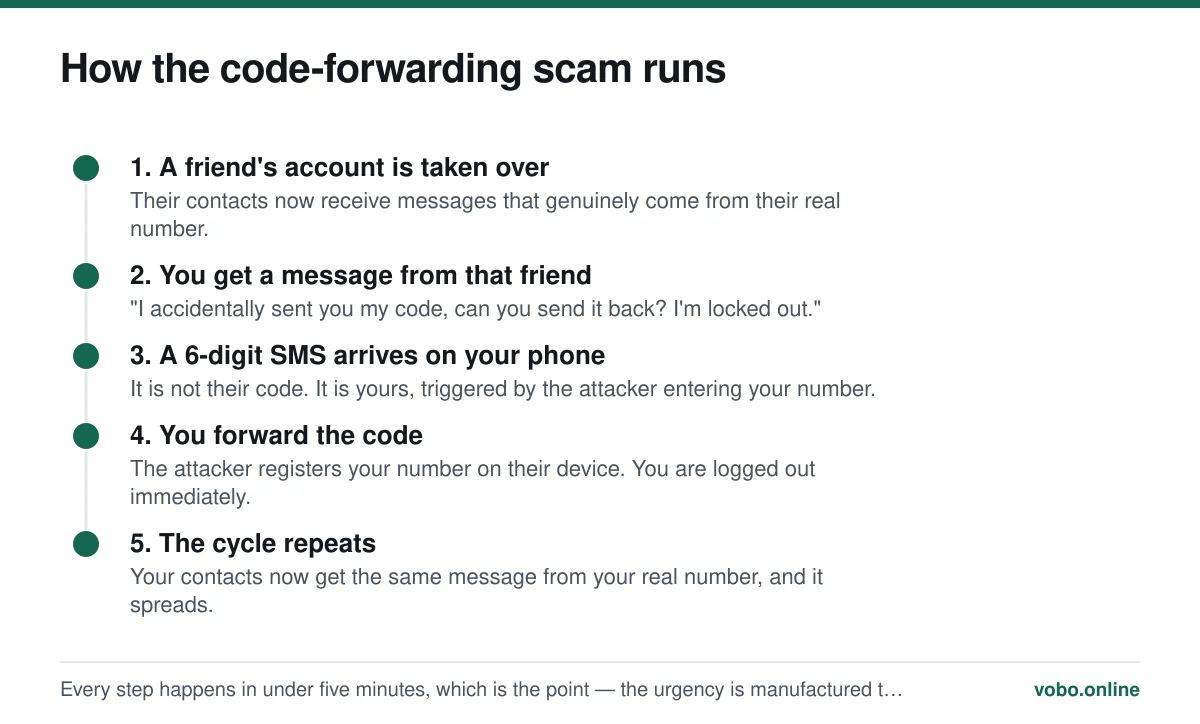
The scam that this code exists to enable
The version above is the dominant WhatsApp account-theft technique worldwide, and it is worth understanding why it works on sensible people rather than only on careless ones.
First, the message really does come from your friend's number, because their account really has been taken over. There is no spoofing to spot and no odd sender address, which removes the usual tell. Second, the request is plausible — codes do get mistyped, and helping a locked-out friend is an ordinary thing to do. Third, it is urgent, and urgency is the active ingredient in nearly every social-engineering attack. The whole thing is designed to be resolved in the thirty seconds before you think to ring the person.
The defence is a single habit: never forward a code, and phone the person if they ask. A voice call takes fifteen seconds and defeats it entirely, because the attacker cannot answer their phone.
When the code does not arrive
The far more common problem is the opposite one: you asked for a code and nothing came. Work through these in order, because the first two account for most cases.
Getting the code to arrive
- Check the number you typed, including the country codeEnter the number without the leading zero that domestic dialling uses. A UK number written 07700 900123 is entered as +44 7700 900123. A leading zero after the country code is the single most common reason the SMS goes nowhere.
- Confirm the SIM is in the phone and has signalThe code is a normal SMS and needs mobile network coverage, not Wi-Fi. If you are registering a number whose SIM is in a different handset, the code arrives on that handset — which is fine, you can type it in manually.
- Wait the full countdown before retryingWhatsApp will not resend until its timer expires, and repeatedly requesting codes can trigger a temporary block on further attempts. Let it run down rather than tapping resend.
- Use the voice call optionOnce the countdown finishes, choose 'Call me'. An automated voice reads the code aloud. This works on landlines and on numbers that cannot receive SMS at all, which is why it is also the route people use to register a landline — see our piece on using WhatsApp without a mobile number.
- Check for message filteringiPhone's 'Filter Unknown Senders' and Android spam filters both put automated SMS into a separate list. Look in the filtered or spam folder of your messaging app before concluding nothing arrived.
- Try a different network pathIf you are abroad and roaming SMS is unreliable, the voice-call option often succeeds where the SMS does not. Behaviour while travelling is covered in using WhatsApp internationally.
Two-step verification, which ends the problem
Two-step verification adds a six-digit PIN of your own choosing, required whenever the number is registered on a new device. It is a different six digits from the SMS code, and it is the one the attacker does not have.
With it switched on, the code-forwarding scam stops working completely. Even if somebody obtains your SMS code, they hit a PIN prompt and cannot proceed. WhatsApp also periodically asks you for the PIN on your own device so you do not forget it, which is mildly annoying and worth tolerating.
Turning on two-step verification
- Open SettingsOn Android, tap the three-dot menu, then Settings. On iPhone, tap Settings in the bottom bar.
- Go to Account, then Two-step verificationOn recent builds this sits under Settings → Account. On some versions it appears under Privacy → Advanced.
- Choose a PIN you will rememberSix digits, not your birth year, and not the same as your phone's unlock code. Write it down somewhere physical if that is what it takes.
- Add an email addressThis is the only recovery route if you forget the PIN. Without it, a forgotten PIN locks you out of your own number for seven days. The email is used for nothing else.
| Registration code | Two-step verification PIN | |
|---|---|---|
| Where it comes from | Sent to you by WhatsApp via SMS or voice call | Chosen by you |
| When you see it | Whenever a number is registered on a device | On registration, and occasionally on your own device |
| Lifetime | Expires in minutes, single use | Permanent until you change it |
| If someone else gets it | They take the account, unless a PIN is set | Useless on its own without the SMS code |
| Recovery if lost | Request another one | Email reset, or a 7-day wait |
| Should you ever share it | Never, under any circumstances | Never |
If the account has already been taken
If you forwarded a code and were logged out, the fix is fast and it is the same mechanism working in your favour: re-register the number. Reinstall WhatsApp if needed, enter your number, and enter the fresh SMS code that arrives on your phone. Because you hold the SIM, you win — the attacker is logged out the moment you register.
- Re-register your number in WhatsApp immediately. Whoever holds the SIM wins this contest.
- If a two-step PIN you did not set is now demanded, wait out the seven-day period WhatsApp imposes. Annoying, but it does return the number to you.
- Turn on two-step verification the moment you are back in.
- Warn your contacts, because the attacker has been messaging them from your number and asking for money.
- Check which devices are linked under Settings → Linked devices and log out anything you do not recognise.
The related but separate question of whether an account can be compromised in other ways — spyware, cloned apps, someone reading your screen — is covered in can WhatsApp actually be hacked, which separates the realistic threats from the marketing claims of so-called hacking services.
“Never share your registration code with others, even friends or family.”
— WhatsApp Help Center, on account registration
Frequently asked questions
Someone keeps sending me WhatsApp verification codes. What should I do?
Nothing, other than ignore and delete them. Repeated codes mean somebody is entering your number on the registration screen, but the codes are useless unless you tell them what the digits are. There is no way for them to progress without your cooperation. If it is persistent, switch on two-step verification so that even a leaked code cannot be used.
Can someone hack my WhatsApp with just my phone number?
No. A phone number alone lets somebody trigger a registration code being sent to you, which is a nuisance rather than a breach. To take the account they need the code itself, which only reaches your phone. The attack is entirely dependent on persuading you to hand it over.
Why does WhatsApp say 'too many attempts, try again later'?
Requesting codes repeatedly triggers a temporary rate limit, typically lasting a few hours. It is a protective measure rather than a fault, and there is no way to shorten it. Wait for the stated time, then use the 'Call me' voice option rather than another SMS request.
Is the 6-digit code the same as the two-step verification PIN?
No, and confusing them causes real problems. The registration code is sent to you by WhatsApp and expires in minutes. The two-step PIN is chosen by you, is permanent, and is what stops a stolen registration code from being enough to take your account.
Sources
- About WhatsApp account registration — WhatsApp Help CenterSupports: That registration is verified by a one-time code sent to the phone number, and that the code must never be shared.
- How to use two-step verification — WhatsApp Help CenterSupports: The PIN mechanism, the optional recovery email, and the seven-day wait if the PIN is forgotten without one.
- Staying safe on WhatsApp — WhatsApp Help CenterSupports: WhatsApp's own description of the code-forwarding scam pattern and the advice to verify unusual requests by another channel.
Related reading

Privacy and security
Can WhatsApp be hacked? What is actually possible, and what is marketing
Almost every 'WhatsApp hacking' claim is false. Here is what can genuinely compromise an account, how to spot it, and how to lock the account down.
Setup and account
How to use WhatsApp without a mobile phone number
You cannot skip verification, but you can register WhatsApp on a landline or a spare number. Here is what works, what fails, and the honest limits.

Setup and account
Does WhatsApp need a phone number? Yes, and here is why it is built that way
WhatsApp requires a phone number that can receive a code — there is no email or username signup. Here is what qualifies, what does not, and why.

Setup and account
How to create a WhatsApp account, step by step
Setting up WhatsApp takes about three minutes. Here is the whole process on iPhone and Android, plus the two settings worth changing immediately.