Why WhatsApp messages are not delivering: the seven real causes
A single tick means WhatsApp's servers have your message but the recipient's phone has not collected it. The overwhelmingly common cause is that their phone is off, out of signal or has WhatsApp force-stopped. Being blocked produces exactly the same single tick, which is why it is not a reliable test — and there is no way to tell the two apart from the outside.
Key takeaways
- One tick is about the recipient's connection, not about you. Their phone has not picked the message up.
- Blocking and a switched-off phone look identical. Anyone claiming a reliable test for blocking is guessing.
- A clock icon rather than a tick means your own connection is the problem, not theirs.
- Messages queue indefinitely and deliver themselves the moment the other phone comes online. Nothing is lost.
First, read the indicator correctly
| Indicator | Where the message is | Whose problem |
|---|---|---|
| Clock | Still on your phone, unsent | Yours — you have no working connection |
| One grey tick | On WhatsApp's servers | Theirs — their device has not collected it |
| Two grey ticks | Delivered to their phone | Nobody's; it arrived |
| Two blue ticks | Opened in the chat | Nobody's; it was read |
| Red exclamation mark | Failed to send | Yours — usually a connection or a very large file |
This distinction does the bulk of the diagnostic work. If you see a clock, stop reading this article and check your own internet connection. Everything below is about the single grey tick.
The seven causes, in order of likelihood
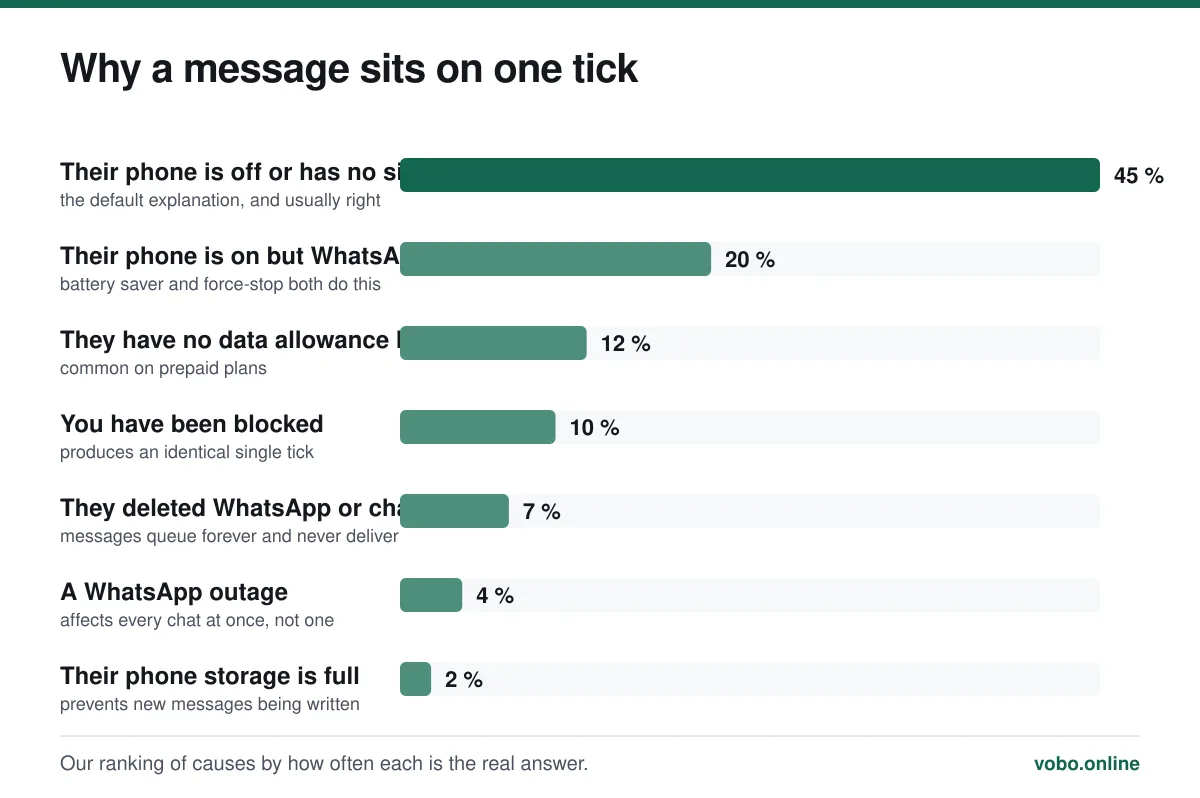
1 and 2: their phone is off, offline, or has WhatsApp shut down
This covers roughly two thirds of cases. A phone that is switched off, in airplane mode, out of coverage, or has run out of battery cannot collect anything. Messages wait on the server and arrive in a burst when it comes back.
Less obvious is the phone that is on but not collecting. Android battery-saver modes aggressively suspend background apps, and a force-stopped WhatsApp receives nothing until it is opened again. On iPhone, a low-power mode plus notifications disabled can produce long delays. In all these cases the person is not ignoring you and does not know a message is waiting.
4: the blocking question, answered honestly
Blocking produces a permanent single tick. So does a phone that has been off for two days. WhatsApp deliberately makes them indistinguishable — the blocked person is given no signal, which is the entire point of the feature.
There are commonly cited 'tests', and none of them are reliable:
- Not seeing their last seen or profile photo. They may simply have set those to My Contacts, or to Nobody. This proves nothing.
- Trying to add them to a group and seeing it fail. This is closer to a genuine signal, but it also fails for people who have restricted who can add them to groups.
- Calling them on WhatsApp. A call to someone who blocked you does not connect — but neither does a call to a phone that is off.
- Third-party apps claiming to detect blocking. These fabricate results. There is no API that exposes it.
5: they deleted the account or changed number
If someone deletes their WhatsApp account or migrates to a new number, messages to the old one queue forever on a single tick. There is no error and no notification — the chat simply stops working, permanently.
A clue is that their profile photo and About line disappear and never come back, and any group you share shows them as no longer participating. Number changes are covered in how to change your WhatsApp number, which explains what contacts do and do not get told.
6: an actual outage
Platform-wide outages happen and are usually resolved within hours. The distinguishing feature is scope: an outage affects every chat at once, and everyone around you notices simultaneously. A problem with one contact is never an outage.
If messages fail to everybody and your internet is otherwise fine, wait rather than troubleshoot. Reinstalling the app during an outage risks losing chat history for no benefit whatsoever.
Checking your own side
The five-minute check on your end
- Confirm you actually have internetLoad a web page. Full signal bars indicate voice coverage, not working data, and the two are different.
- Toggle airplane mode on and offThis forces a fresh network registration and fixes a surprising share of stuck connections.
- Check WhatsApp has background data permissionAndroid: Settings → Apps → WhatsApp → Mobile data, with background data allowed. iPhone: Settings → WhatsApp → Cellular Data on.
- Test with a different contactThis is the single most useful diagnostic. If everyone else receives your messages, the problem is that one contact's device — or that one contact.
- Check the date and time on your phoneA badly wrong clock breaks the encrypted connection to WhatsApp's servers. Set it to automatic.
- Update the appVery old versions stop working entirely. See how to update WhatsApp.
If the app itself is misbehaving — refusing to open, calls not connecting, media not loading — the broader triage is in why WhatsApp is not working.
What not to do
- Do not reinstall WhatsApp as a first step. It rarely helps with delivery problems and risks your chat history if backups are not current.
- Do not repeatedly resend. The message is queued; sending it eight more times means they receive eight more messages when they come back online.
- Do not conclude you have been blocked after an hour. Phones are off overnight, on flights and in meetings.
- Do not install an app that claims to tell you who blocked you. It cannot, and many of them harvest your account.
Frequently asked questions
What does one grey tick mean on WhatsApp?
The message reached WhatsApp's servers but has not been collected by the recipient's device. Almost always their phone is off, out of signal, or has WhatsApp suspended. It can also mean you are blocked, and there is no way to tell which.
How long do WhatsApp messages stay undelivered?
Indefinitely from your side — the chat keeps showing one tick. WhatsApp holds undelivered messages on its servers for a limited period, historically around 30 days, after which very old undelivered messages may be discarded.
Can I tell if someone blocked me on WhatsApp?
Not definitively. Blocking is designed to be undetectable. A combination of a permanent single tick, no profile photo, no last seen and a failure to add them to a group is suggestive, but each of those has innocent explanations.
Why do my messages send to some people but not others?
Because the problem is on the receiving end. If most contacts receive your messages normally, your connection and your account are fine, and the issue is that specific person's device or their block list.
Sources
- About message information — WhatsApp Help CenterSupports: The precise meaning of one tick, two ticks and blue ticks, and that delivery depends on the recipient's device collecting the message.
- About blocking and reporting contacts — WhatsApp Help CenterSupports: That blocked contacts receive no indication of being blocked and that their messages remain on a single tick.
Related reading
Troubleshooting
Why WhatsApp is not working, and how to fix it in order
An ordered triage for WhatsApp that will not open, connect, call or download — starting with the causes that are actually most common.
Privacy and security
How to see your blocked numbers on WhatsApp, and what blocking does
Your block list is at Settings → Privacy → Blocked contacts. Here is what blocking hides, what it does not, and what happens when you unblock.

Features explained
How WhatsApp works, from registration to read receipts
A complete plain-language guide to operating WhatsApp: setting up, sending messages, the tick system, calls, groups, backups and linked devices.
Features explained
What 'online', 'last seen' and popup notifications actually mean
WhatsApp's status indicators get over-read constantly. Here is what each one genuinely proves, and what it does not.