Does WhatsApp work without Wi-Fi? Yes — and here is what it costs
Yes — WhatsApp needs an internet connection rather than Wi-Fi specifically, and mobile data is one, so the app behaves identically on either. What it will not do is work with no connection at all. That is the real difference from SMS, which travels over the carrier's signalling network and needs no data plan.
Key takeaways
- Any internet connection works: 4G, 5G, 3G, Wi-Fi or a tethered laptop. WhatsApp treats them identically.
- A voice call uses roughly 300 KB per minute — about 18 MB an hour. Video is roughly ten times that.
- Text messages are tiny. A thousand of them is under a megabyte; photos and voice notes are what consume a data allowance.
- With no connection at all, messages queue on your phone and send themselves when signal returns. Nothing is lost.
What WhatsApp actually requires
WhatsApp needs a working internet connection. That is the entire requirement. Where the connection comes from is irrelevant to the app: home Wi-Fi, café Wi-Fi, 5G, 4G, a slow 3G signal in a valley, or a laptop hotspot all look the same to it.
The question gets asked so often because of how WhatsApp displaced SMS. SMS is genuinely different — it rides on the mobile network's control channel, works with no data allowance whatsoever, and will get through on one bar of signal when nothing else will. WhatsApp cannot do that. It is an internet application wearing the interface of a texting app, and the distinction only becomes visible when the data runs out.
How much data it actually uses
These figures come from WhatsApp's own storage-and-data documentation combined with what typical usage looks like in practice. They are approximate — codecs adapt to connection quality, so a call on a poor signal uses less data and sounds worse — but they are the right order of magnitude to plan around.
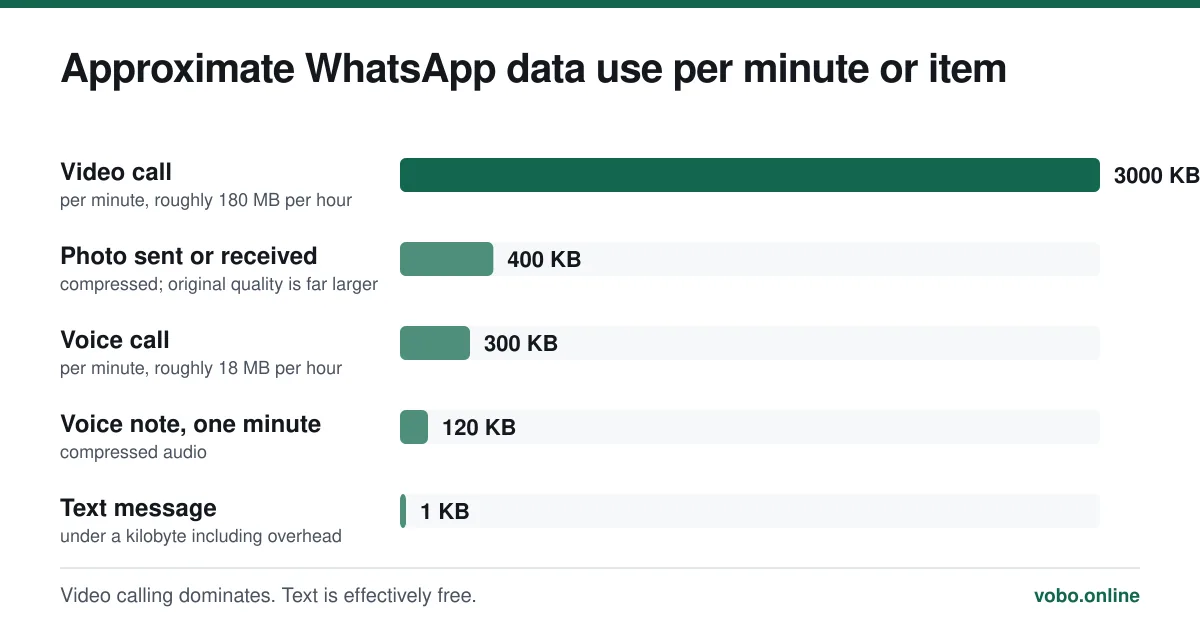
The practical reading of that chart: if you are worried about a data allowance, worry about video calls and photos. A person who sends two hundred text messages a day uses less data on messaging than on loading a single news website.
| Activity | Roughly how much fits in 1 GB |
|---|---|
| Text messages | About a million — you will never reach it |
| Voice calls | About 55 hours |
| Voice notes | About 140 hours |
| Photos | About 2,500 sent or received |
| Video calls | About 5 to 6 hours |
Cutting the data WhatsApp uses
Two settings do most of the work, and the first one matters far more than people expect.
Reducing WhatsApp's data consumption
- Turn off automatic media download on mobile dataSettings → Storage and data → Media auto-download. Set photos, audio, video and documents to 'Wi-Fi only' — or to 'No media' on cellular. Automatic downloading in busy group chats is the single largest avoidable data cost on the app.
- Switch on 'Use less data for calls'Same menu, under Call settings. It reduces call quality slightly and cuts the bitrate. On a metered or roaming connection it is worth the trade.
- Set media upload quality to Data saverSettings → Storage and data → Media upload quality. Photos you send get compressed harder, which is usually invisible on a phone screen.
- Check what is actually using the dataSettings → Storage and data → Manage storage shows which chats hold the most media. It is often one group nobody remembers joining.
What happens with no connection at all
WhatsApp fails gracefully, which is one of the genuinely well-designed parts of the app. Messages you write while offline sit in the chat with a small clock icon instead of a tick, and send themselves the moment a connection returns. You do not need to retype or resend anything.
You can still read your existing chats offline, because they are stored on the device. You cannot receive anything new, cannot make calls, and cannot load media you have not already downloaded.
A clock icon that never becomes a tick means your phone has no working connection. A single tick that never becomes two means the message reached WhatsApp's servers but the recipient's phone has not collected it — a completely different problem, covered in why WhatsApp messages are not delivering.
Mobile data abroad
WhatsApp behaves identically abroad — it is the billing that changes. Inside a roaming zone where your allowance applies, nothing is different. Outside one, data can be charged at rates that make an hour-long video call genuinely expensive.
The safe pattern while travelling is to disable data roaming, use Wi-Fi for calls, and keep auto-download off. The fuller picture, including which countries block the service outright, is in using WhatsApp internationally.
Does any of this appear on your phone bill?
Only as data. Because WhatsApp calls are not carrier calls, they are never itemised, never show a number you called, and never appear as minutes. They are absorbed into your total data consumption alongside everything else the phone did that month.
This is one of the most-searched questions about the app and it has a precise answer, which is set out in do WhatsApp calls appear on your phone bill.
A note on Wi-Fi calling, which is a different thing
Your phone's own 'Wi-Fi calling' feature routes ordinary carrier calls over Wi-Fi when the mobile signal is poor. It uses your normal minutes and appears on your bill in the normal way. It has nothing to do with WhatsApp, which never touches your minutes at all. The two get conflated constantly, usually in the direction of someone assuming a WhatsApp call has cost them minutes.
Frequently asked questions
Can I use WhatsApp with no SIM card?
Once the account is registered, yes — a phone with no SIM but a Wi-Fi connection will run WhatsApp normally. The SIM is only needed for the initial registration code, and even that can arrive on a different device. Registration itself is covered in what the six-digit code is for.
Does WhatsApp use data when I am not using it?
A small amount. It keeps a connection open to receive messages, which costs a few megabytes a month, and it may download media in the background if auto-download is left on. The background connection is negligible; auto-download is not.
Is WhatsApp calling free on mobile data?
There is no charge from WhatsApp. The call consumes about 300 KB per minute of your data allowance, so it is free on an unlimited plan and costs whatever your data costs otherwise. Some carriers exclude VoIP calls from 'unlimited social media' bundles.
Why does WhatsApp say 'connecting' when I have full signal?
Full bars indicate voice signal, not working data. You may have exhausted your allowance, have mobile data switched off for that app, be behind a captive-portal Wi-Fi you have not signed into, or be on a network that blocks the service. Toggling airplane mode on and off resolves a surprising share of these.
Sources
- How to manage storage and data usage — WhatsApp Help CenterSupports: The media auto-download settings, the 'use less data for calls' option and the per-chat storage breakdown described in the steps above.
- About voice and video calls — WhatsApp Help CenterSupports: That calls run over the internet connection rather than the carrier voice network, and consume data rather than minutes.
Related reading
Calls, data and cost
Do WhatsApp calls appear on your phone bill?
WhatsApp calls are never itemised on a phone bill because they are not carrier calls. Here is what a bill can and cannot reveal about your WhatsApp use.
Calls, data and cost
Does WhatsApp work internationally, and what does it cost abroad?
WhatsApp works in almost every country with no extra charge, because messages travel over the internet. Here is what changes abroad and where it is blocked.
Calls, data and cost
Is WhatsApp free? Yes, and here is what it actually costs you
WhatsApp costs nothing to install or use, and has since 2016. The real costs are data, roaming and what Meta gets from your metadata.
Troubleshooting
Why WhatsApp messages are not delivering: the seven real causes
One tick means the message reached WhatsApp but not the recipient's phone. Here are the seven causes, ranked by how common they actually are.