How to change your name on WhatsApp, and who actually sees it
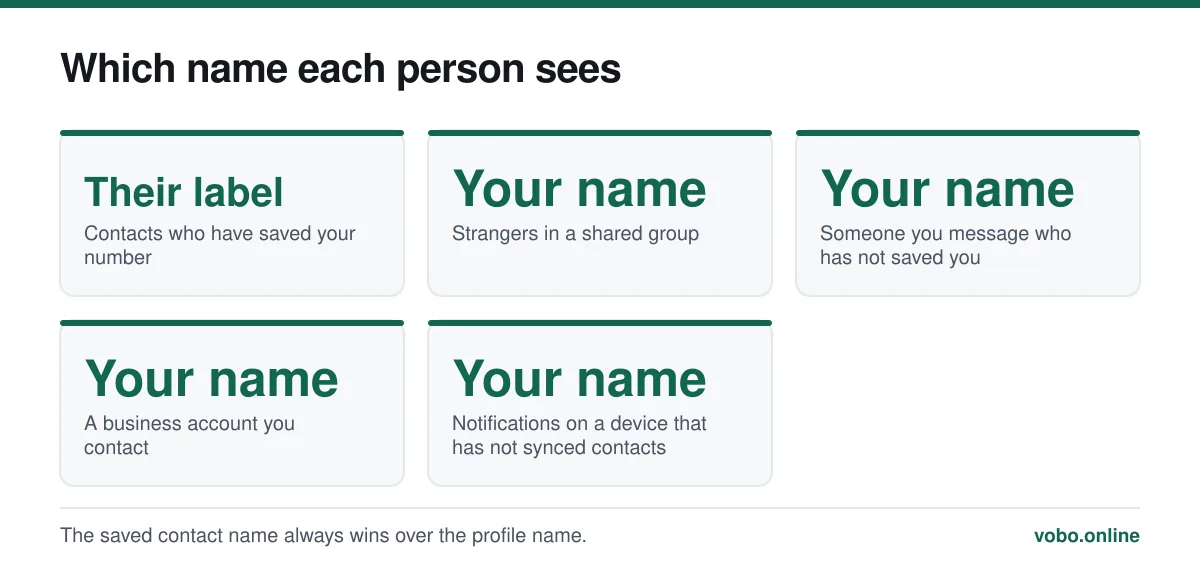
Open Settings, tap your name at the top, tap the pencil next to the name field, type the new one and save. The change is instant, but most of your contacts will not see it: anyone who has you saved in their phone book sees the name they gave you, not the one you chose. Your profile name is only shown to people who have not saved your number.
Key takeaways
- Changing the name takes seconds and applies immediately across every device linked to your account.
- Contacts who have saved you see their own label for you. Your chosen name is invisible to them.
- The profile name is what shows in groups to strangers, and in a new chat before anyone saves you.
- There is no character limit worth worrying about at 25 characters, and emoji are allowed.
The steps
Changing your WhatsApp profile name
- Open WhatsApp SettingsOn Android, tap the three dots at the top right and choose Settings. On iPhone, tap Settings in the bottom bar.
- Tap your own name at the topThis opens your profile, showing your photo, name, About line and phone number.
- Tap the pencil icon beside your nameOn iPhone the name field becomes editable directly; on Android the pencil is at the right-hand end of the row.
- Type the new nameUp to 25 characters. Emoji count as characters and are permitted.
- SaveTap the tick on Android, or Done on iPhone. The change applies immediately and syncs to any linked devices.
Three different names, and why yours may not show
This is the part that confuses people, and it explains almost every "I changed my name but my friend still sees the old one" question. WhatsApp deals with three separate names.
| Name | Set by | Who sees it |
|---|---|---|
| Profile name | You, in Settings | Anyone who has not saved your number: strangers in groups, new chats, business accounts |
| Contact name | Each of your contacts, in their own phone book | Only that person. It always overrides your profile name for them |
| Group nickname | Does not exist | WhatsApp has no per-group name feature, unlike some other apps |
So if your friend saved you as "Dave Work" three years ago, changing your profile name to anything at all will not alter what they see. Their phone book wins, every time, and there is no way for you to override it. The only person who can change that label is them.
The corollary is that your profile name matters most with people who do not know you — a neighbourhood group, a marketplace conversation, a school parents' chat. Those are precisely the contexts where the name is doing real work, which is a reason to set something sensible rather than an in-joke.
What you can and cannot put in it
- Up to 25 characters, including spaces and emoji.
- No requirement to use a real name. WhatsApp does not verify identity and has no real-name policy for personal accounts.
- You can leave it as a single character, though a blank name is not accepted.
- Changing it as often as you like is fine; there is no cooldown.
- Business accounts are different — WhatsApp Business display names are subject to a naming policy and cannot always be changed freely.
Changing what you see for someone else
To change how another person appears in your own chat list, edit them in your phone's contacts app rather than in WhatsApp. WhatsApp reads the name from the phone book and will pick up the change within a few seconds, sometimes after a restart of the app.
If a contact shows only as a number, you have not saved them. Adding them is covered in how to add a contact in WhatsApp. If a contact shows an odd label such as "user defined", that is coming from your phone's contact card rather than from WhatsApp — see what 'user defined' means.
The other things on the same screen
The profile screen where the name lives also holds two other fields worth setting deliberately.
- The profile photo, which by default is visible to anyone who has your number. Changing it, and restricting who sees it, is covered in changing your WhatsApp profile photo.
- The About line, a short status text that defaults to "Hey there! I am using WhatsApp". It follows the same visibility rules as the photo and is worth either writing or restricting.
None of these affect the phone number shown to a chat participant, and none of them are hidden from someone in a group with you unless you have set the corresponding privacy control to My Contacts.
When the name does not update
- Check you saved it. On Android the tick must be tapped; leaving the screen without it discards the edit.
- Confirm you are looking at the right thing. Asking a contact who has you saved will always show the old name — ask someone who has not saved you, or check how you appear in a group.
- Force-close and reopen WhatsApp. Linked devices in particular can lag by a few seconds.
- Check your connection. The change is written to WhatsApp's servers, so an offline phone shows it locally but does not propagate it.
If nothing on that list applies and the app is behaving strangely more generally, the broader triage is in why WhatsApp is not working.
Frequently asked questions
Why does my friend still see my old name on WhatsApp?
Because they have you saved in their phone's contacts, and the saved name always overrides your profile name. Nothing you do on your side changes it. They would have to edit the contact in their own phone book.
Does changing my WhatsApp name notify my contacts?
No. There is no notification, no chat message and no indication anywhere. It changes silently for the people who could see it in the first place.
Can I use a different name in different groups?
No. WhatsApp has one profile name per account and no per-group nickname feature. The same name appears in every group where the other members have not saved your number.
Is there a limit on how often I can change my name?
No. Unlike the phone number, which has a real migration process behind it, the display name is a simple text field with no cooldown or limit on changes.
Sources
- How to edit your profile — WhatsApp Help CenterSupports: The exact menu path for editing the profile name, the 25-character limit, and the About field on the same screen.
- How to add a contact — WhatsApp Help CenterSupports: That WhatsApp displays the name saved in the device's contact list in preference to the account's own profile name.
Related reading
Setup and account
How to change your WhatsApp profile photo, and who can see it
Changing your WhatsApp photo takes four taps on any platform. The setting that matters more is who is allowed to see it — which defaults to everyone.

Setup and account
How to add a contact in WhatsApp, four different ways
Add someone from inside WhatsApp, from your phone book, by QR code, or message them without saving them at all. Plus why a contact fails to appear.

Features explained
What does 'user defined' mean in WhatsApp?
'User defined' is a label from your phone's contacts app, not from WhatsApp. It means a number was saved under a custom label rather than Mobile or Home.
Setup and account
How to change your WhatsApp number without losing your chats
The Change Number tool migrates your chats, groups and settings to a new number and tells your contacts. Do it before you lose the old number.