Does WhatsApp show your phone number, and to exactly whom?
Yes — your phone number is your WhatsApp account, so everyone you exchange messages with can see it, and no setting hides it from someone in the chat. In a group, every member sees it, whether or not you have ever spoken to them. You can hide your photo, your About and your last seen, but never the number itself.
Key takeaways
- The number is the account. Hiding it from someone you are messaging is not possible, and no setting or trick changes that.
- Group chats are the real exposure: joining a 200-person group shows your number to 199 strangers at once.
- WhatsApp Channels are the exception — followers are anonymous to the admin and to each other.
- What you can control is your profile photo, About text, last seen, online status and read receipts. Those are worth setting deliberately.
Why the number cannot be hidden
WhatsApp has no usernames. When you register, the phone number becomes the account identifier, the way an email address identifies an email account. Every message you send is addressed from that number, and the recipient's app needs it to route replies back. There is nothing to hide it behind.
This is a design decision, not an oversight, and it has a real upside: it is why WhatsApp needed no friend requests, no invite codes and no directory. Your existing phone book was the contact list, which is a large part of why the app spread as fast as it did. The cost of that convenience is the one this article is about.
Note the asymmetry that confuses people. If someone has your number saved in their contacts, WhatsApp shows them your saved name. If they do not, it shows them the raw number. Either way they have the number — the display is a courtesy, not a protection.
Exactly who can see it
| Context | Can they see your number? | Detail |
|---|---|---|
| Someone you message directly | Yes, always | They receive it as the sender identifier |
| A group you join | Yes, to every member | Tapping your entry in the member list reveals it |
| A group admin before you join | Yes | They had to have your number to add you |
| A community you belong to | Members of shared groups only | Community announcement groups hide members from each other |
| A WhatsApp Channel you follow | No | Followers are anonymous to the admin and to other followers |
| A business you message | Yes | Businesses can store it in their CRM and use it under their own policy |
| Someone who has your number but you have not replied | Yes | They already have it — that is how they messaged you |
| A stranger browsing the app | No | There is no directory or search by name |
What you can actually control
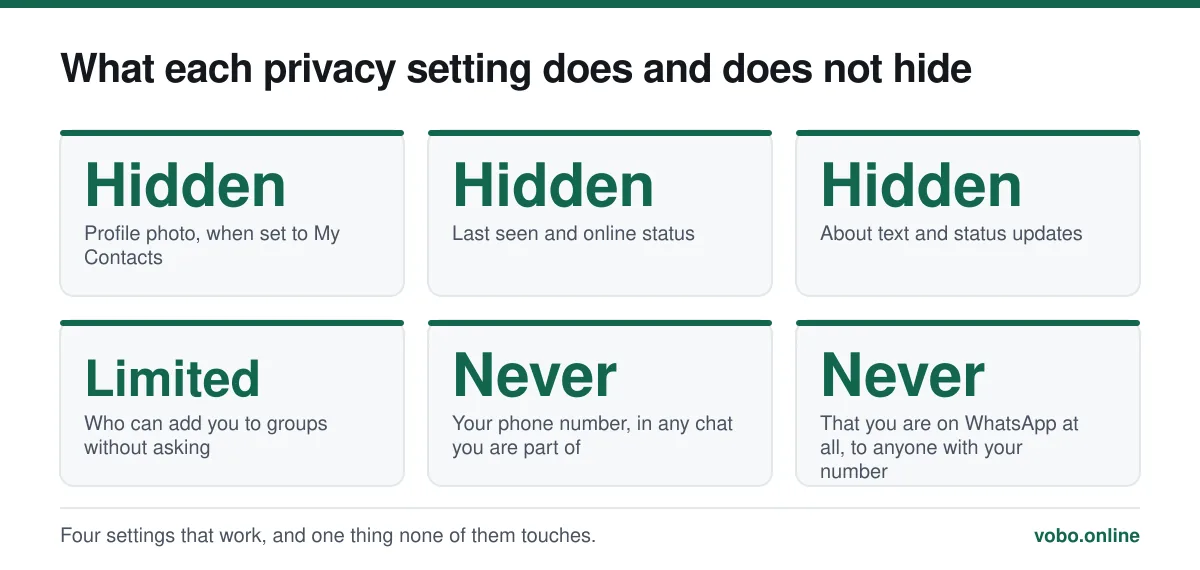
The privacy menu governs everything except the number. Setting it deliberately takes about two minutes and is worth doing once properly rather than never.
Setting your privacy options
- Open Settings → PrivacyOn Android this is under the three-dot menu; on iPhone it is in the bottom bar. The list of controls is identical on both.
- Set 'Last seen and online'Choose Nobody or My Contacts. Setting last seen to Nobody also lets you set online status to 'Same as last seen', which stops the live indicator.
- Set 'Profile photo' to My ContactsLeft on Everyone, your photo is visible to anyone who has your number — including people who obtained it from a group member list.
- Set 'About' to My ContactsThe About line is a small field that people fill with real information surprisingly often.
- Decide about read receiptsTurning them off hides your blue ticks but also hides everyone else's from you. It does not apply to groups, where read receipts cannot be disabled.
- Set 'Groups' to 'My contacts except…'This controls who can add you to a group without asking. It is the single most effective setting for limiting number exposure.
Reducing exposure without hiding the number
Since the number itself is fixed, the practical strategy is to control which contexts it appears in.
- Restrict group additions. Settings → Privacy → Groups → 'My contacts', so strangers cannot pull you into a 200-person room.
- Leave large groups you do not use. Every member list you are on is a copy of your number sitting on someone else's phone.
- Be careful with public group invite links. Anyone who finds the link can join and read the member list.
- Use a second number for public-facing use. A cheap prepaid SIM or an eSIM for marketplace listings and community groups keeps your primary number out of them.
- Use WhatsApp Business for a business. It is free, and it keeps commercial contacts separate from a personal account.
People often ask whether there is a workaround that hides the number from a specific person. There is not, and the apps that claim to provide one are either useless or malicious. The full version of that answer, including what the various "hide my number" tricks actually do, is in how to hide your phone number in WhatsApp.
The second-number approach, honestly assessed
Registering WhatsApp on a number that is not your main one is the only method that genuinely separates your identity from your messaging. It works, and it is what people who need this actually do.
The catch is that the second number has to be real and has to receive a verification code. A prepaid SIM costs a few pounds or dollars and works permanently. Virtual numbers from VoIP providers work sometimes — WhatsApp blocks many known VoIP ranges, and a number that registers today may fail tomorrow. The practical detail is in using WhatsApp without a phone number.
Business accounts and what they may do with it
Messaging a business account gives that business your number in a form they can export into their own systems. Their use of it is governed by their privacy policy and by the data protection law where you live, not by WhatsApp's rules. Under UK and EU GDPR they need a lawful basis to send you marketing, and you can object.
In practice, if you message a shop to ask whether something is in stock, assume the number is now in their customer list. That is usually fine and occasionally not, and it is a reason to think about which number you use for commercial contact.
Seeing other people's numbers
The rules run both ways. You can see the number of anyone who messages you and of anyone in a group with you, whether or not they are in your contacts. In a group, tap the group name, then a member, to see it.
One common misreading: a name appearing instead of a number does not mean the number is hidden. It means you have that person saved. Someone else in the same group, who does not have them saved, sees the raw number. Related interface confusions — including the odd "user defined" label some phones show — are explained in what 'user defined' means in WhatsApp.
Frequently asked questions
Can someone see my phone number if I have not saved theirs?
Yes. Saving a contact is a one-way action on your own phone that only affects what name you see. It has no effect on what the other person sees, and they will have your number regardless.
Does WhatsApp show my number in a group to people I do not know?
Yes, to every member of that group. Anyone in a group with you can tap the member list and read your number. This is the main way numbers leak, and it is why the 'who can add me to groups' setting matters more than most people realise.
Can I use WhatsApp with a username instead of a number?
Not at the time of writing. WhatsApp has been publicly working on optional usernames, and the feature has appeared in test builds, but registration and account identity still rest on a phone number. Treat any article claiming usernames are live as either premature or region-specific.
If I block someone, can they still see my number?
Yes. Blocking stops them contacting you and hides your last seen, profile photo and status from them. It does not retract the number, which they already have, and it does not remove you from the member list of any group you share.
Sources
- How to change your privacy settings — WhatsApp Help CenterSupports: The exact set of privacy controls available — last seen, online, profile photo, About, groups — and that the phone number is not among them.
- About WhatsApp Communities — WhatsApp Help CenterSupports: That community announcement group members are not visible to each other, unlike ordinary group members.
- About WhatsApp Channels — WhatsApp Help CenterSupports: That channel followers are anonymous to admins and to other followers, making channels the one context where the number is not exposed.
Related reading
Privacy and security
How to hide your phone number on WhatsApp — and what you actually can hide
You cannot hide your number from someone you message, but you can control almost everything else. Here is what works, what does not, and the second-number option.
Setup and account
How to use WhatsApp without a mobile phone number
You cannot skip verification, but you can register WhatsApp on a landline or a spare number. Here is what works, what fails, and the honest limits.
Privacy and security
Is WhatsApp safe for sending private photos?
Encryption protects the photo in transit. It does nothing about backups, screenshots or the person receiving it — which is where the real risk sits.
Privacy and security
How to see your blocked numbers on WhatsApp, and what blocking does
Your block list is at Settings → Privacy → Blocked contacts. Here is what blocking hides, what it does not, and what happens when you unblock.