Can you get WhatsApp on a Samsung tablet or an iPad?
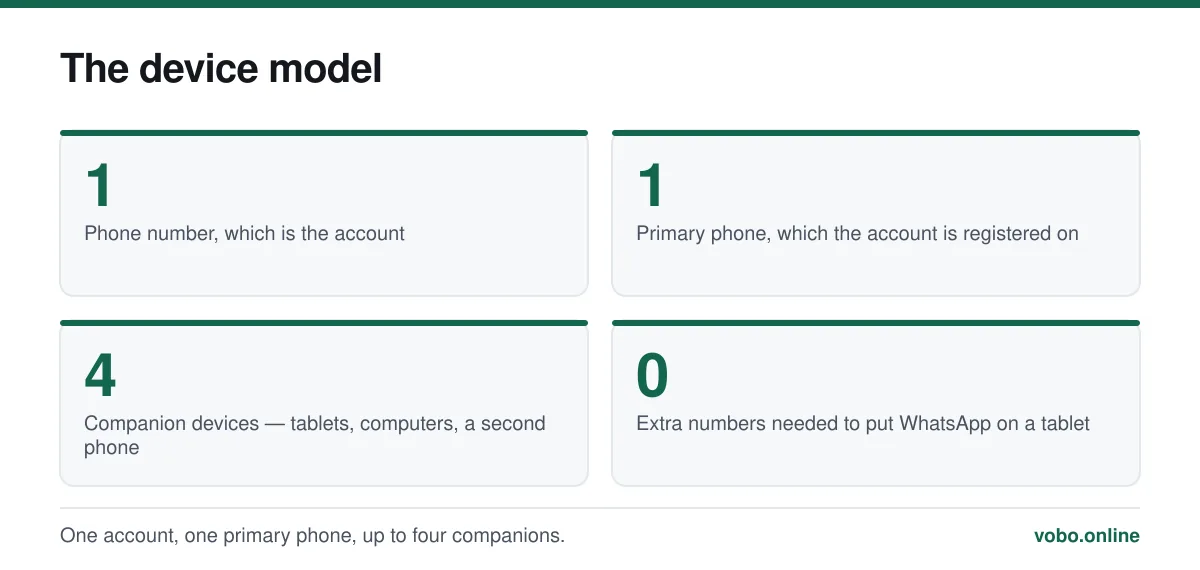
Yes. On an Android tablet, install WhatsApp from Google Play and choose to link it to an existing account rather than registering a new number — it becomes one of your four companion devices and works even when your phone is off. On iPad, WhatsApp released a native app that links the same way.
Key takeaways
- Link the tablet as a companion device rather than registering a separate number.
- Companion devices keep working when the primary phone is switched off.
- Four companion devices per account, and a tablet uses one of the four.
- A linked tablet reads all your chats, so a shared family tablet is a poor place for one.
How WhatsApp works on a tablet
WhatsApp's account model is one number, one account, and that has not changed. What has changed is that an account can drive several devices at once. Since 2023 those companion devices work independently of the phone — link a tablet, switch the phone off, and the tablet keeps receiving messages.
So a tablet does not get its own WhatsApp account. It gets a window onto yours. That is almost always what people actually want, and it avoids the mess of running a second number.
Android tablets, including Samsung
Linking an Android tablet
- Install WhatsApp from Google PlaySearch for WhatsApp Messenger. If Play says it is not compatible, see the troubleshooting section below.
- Open it and choose to link a deviceRather than entering a phone number, look for 'Link this device' or a similar option on the first screen. On some builds it is behind the three-dot menu.
- A QR code appears on the tabletLeave it on screen.
- On your phone, open Settings → Linked devices → Link a deviceThe phone may ask for your fingerprint, face or passcode first.
- Scan the tablet's code with the phoneIt links within a second or two and your chats sync across. A large history takes a few minutes.
iPad
For years the answer here was no, and a great deal of stale advice about workarounds still circulates. WhatsApp released a native iPad app, and it links exactly like any other companion device: open it, and scan the QR code with your iPhone from Settings → Linked devices.
The old workaround was to open web.whatsapp.com in Safari with 'Request Desktop Website' enabled. That is no longer necessary, and the native app is considerably better behaved about notifications.
What a linked tablet can and cannot do
| On a linked tablet | |
|---|---|
| Send and receive messages | Yes |
| Voice and video calls | Yes |
| Works when the phone is off | Yes, indefinitely in normal use |
| View and post status updates | Yes |
| Full chat history | Syncs across, though very old media may not |
| Register its own number | Only by creating a separate account, which is usually not what you want |
| Counts toward the four-device limit | Yes |
The security question worth thinking about
A linked tablet has full access to every conversation on your account, and it keeps that access when your phone is nowhere near. That is the feature, and it is also the risk.
- Do not link a shared family tablet unless you are comfortable with everyone who uses it reading your messages.
- Put a lock screen on the tablet. Without one, the link is equivalent to leaving WhatsApp open on a table.
- Audit Settings → Linked devices occasionally and log out anything you no longer use.
- Consider Chat Lock for sensitive conversations, which syncs to companion devices — see how to unlock chats on WhatsApp.
The same QR-linking mechanism is the basis of a common account-theft scam, and it is worth understanding what you are scanning: how to scan a WhatsApp QR code.
A tablet as the only device
If you have no phone at all, a tablet can host the account outright — but registration still needs a number that can receive a code. A landline works, using the automated voice call. Once registered, the tablet runs the account on Wi-Fi with no SIM involved.
The full set of options, including which number types WhatsApp accepts and which it refuses, is in using WhatsApp without a phone number.
When it will not install or link
- Google Play says the app is incompatible — usually an old Android version on the tablet. Check for a system update; if none is available, the tablet may be below WhatsApp's supported floor. See how to update WhatsApp.
- No 'link this device' option — the tablet's WhatsApp build is out of date. Update it from Play.
- The QR code will not scan — increase the tablet's screen brightness and hold the phone 20 to 30 centimetres away. Codes also expire after a minute or so; refresh for a new one.
- Chats sync but stop updating — the tablet has lost its connection, or the session was logged out from the phone. Check Settings → Linked devices on the phone.
- You have hit four devices — log out one you no longer use, from the same screen.
Frequently asked questions
Can I use WhatsApp on a Samsung tablet?
Yes. Install it from Google Play and choose to link it to your existing account rather than registering a number. It becomes a companion device and works even when your phone is switched off.
Is there a WhatsApp app for iPad?
Yes. WhatsApp released a native iPad app that links to your account by QR code, the same way a computer does. The old workaround of loading web.whatsapp.com in desktop mode is no longer needed.
Can I use WhatsApp on a tablet without a phone?
Yes, if you can receive a verification code somewhere — a landline works using the voice-call option. After registration the tablet runs the account on Wi-Fi with no SIM required.
Do I need a separate number for WhatsApp on a tablet?
No, if you are linking it to your existing account. You would only need a second number if you deliberately wanted a second, independent WhatsApp account on the tablet.
Sources
- How to use WhatsApp on linked devices — WhatsApp Help CenterSupports: The four-companion-device limit, the QR linking flow, and that companion devices work when the primary phone is offline.
- About supported operating systems — WhatsApp Help CenterSupports: That an out-of-date tablet operating system can make the app unavailable in the store.
Related reading
Features explained
How to scan a WhatsApp QR code, and the scam that abuses it
WhatsApp uses QR codes for two different jobs: adding a contact and linking a device. Here is how to scan each, and why one of them is dangerous.
Setup and account
How to use WhatsApp without a mobile phone number
You cannot skip verification, but you can register WhatsApp on a landline or a spare number. Here is what works, what fails, and the honest limits.

Features explained
How WhatsApp works, from registration to read receipts
A complete plain-language guide to operating WhatsApp: setting up, sending messages, the tick system, calls, groups, backups and linked devices.
Troubleshooting
How to update WhatsApp on iPhone and Android
Updating WhatsApp goes through the App Store or Google Play. Here are the steps, how to automate it, and what to do when the update is refused.