How to add a contact in WhatsApp, four different ways
Open the new-chat screen, tap 'New contact', and enter the name and number in international format. WhatsApp reads your phone's contact list, so anything you save there appears in the app within seconds. If a contact does not show up, the cause is almost always a number saved without the country code.
Key takeaways
- WhatsApp does not have its own address book. It mirrors your phone's contacts.
- Save numbers in full international format — plus sign, country code, no leading zero.
- You can message someone without saving them, using a wa.me link or by replying to their message.
- A contact who never appears is either not on WhatsApp, or saved in the wrong format.
Adding from inside WhatsApp
The standard method
- Tap the new chat buttonThe speech-bubble or pencil icon: bottom right on Android, top right on iPhone.
- Choose 'New contact'It sits at the top of the contact list, above your existing contacts.
- Enter the name and numberInclude the country code. Select the country from the picker if there is one, then type the number without its leading zero.
- SaveThe contact is written to your phone's address book, not to WhatsApp, and appears in the app within a few seconds.
Adding through your phone's contacts app
Because WhatsApp mirrors the system address book, saving a contact anywhere on the phone makes it available in WhatsApp. This is often faster if you are already in the Phone or Contacts app after a call.
The same mirroring is why WhatsApp shows the name you saved rather than the person's own profile name — a point that surprises people trying to change how they appear to others, explained in how to change your WhatsApp name.
Adding by QR code
The fastest method in person, and the only one that cannot be mistyped. Each account has a personal QR code encoding its number.
- Both of you open Settings and tap your own name, then the QR icon.
- One person stays on 'My code'; the other switches to 'Scan code'.
- Point the camera at the code. It detects automatically and offers to add the contact.
- Confirm. Nothing is saved until you do.
Contact QR codes are harmless and can be reset at any time. Device-linking QR codes are an entirely different thing and should never be scanned from someone else's screen — the distinction, and the scam that depends on people missing it, is in how to scan a WhatsApp QR code.
Messaging someone without saving them
Sometimes you need one conversation with a plumber and do not want them in your address book forever. Three ways to do it.
| Method | How | Note |
|---|---|---|
| wa.me link | Open wa.me/44770090012 in a browser, with the full number and no plus or spaces | Works on every platform; opens a chat directly |
| Reply to their message | If they messaged you first, just reply | The chat exists without a contact entry |
| Share a contact card | Have a mutual contact send you their card, then tap it | Opens a chat without saving anything |
When a contact does not appear
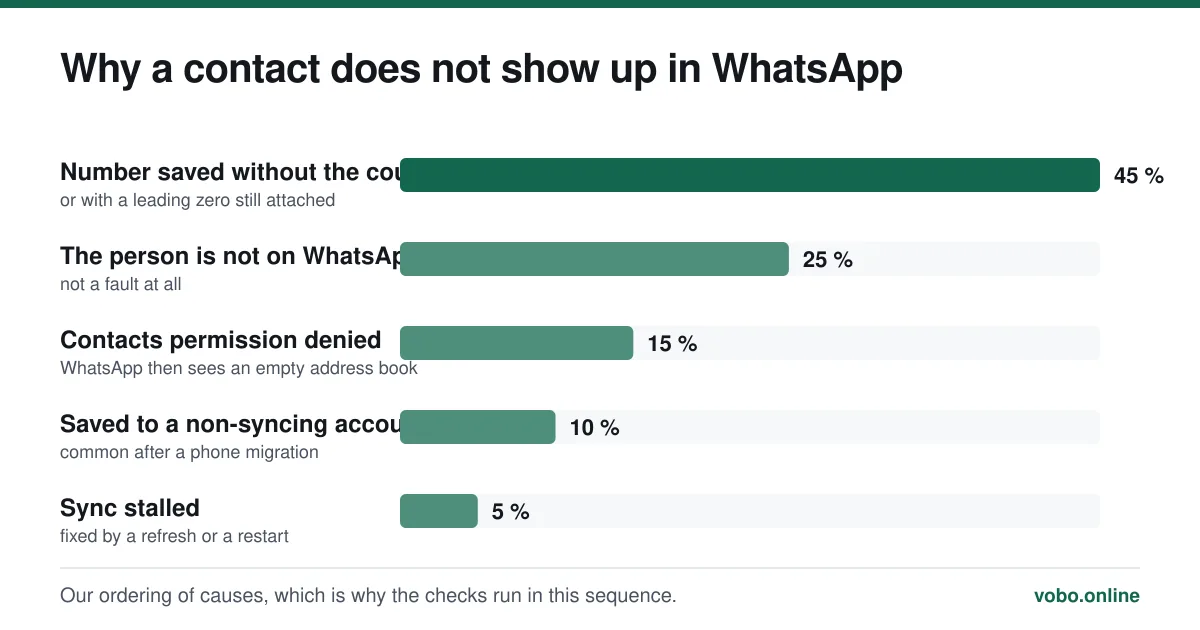
This is the most common problem with contacts, and it has a short list of causes in order of likelihood.
Fixing a missing contact
- Check the number formatCountry code, no leading zero. This is the cause in most cases, particularly for international numbers.
- Pull down to refresh the contact listOn the contact-picker screen, pull down. WhatsApp re-syncs against the phone book.
- Check contacts permissionAndroid: Settings → Apps → WhatsApp → Permissions → Contacts. iPhone: Settings → WhatsApp → Contacts. If this is off, WhatsApp sees nothing.
- Confirm they are actually on WhatsAppIf the number is not registered, it will never appear. Ask them, rather than assuming a fault.
- Check where the contact was savedA contact saved to a SIM card or a secondary account the phone is not syncing may not be visible to WhatsApp. Save it to the main account instead.
- Restart the app, then the phoneContact sync occasionally stalls, and this clears it.
If you declined contact access
WhatsApp works without contacts permission, but the experience is noticeably worse: everyone appears as a raw number, and you cannot pick people from a list. You can still message anyone using a wa.me link or by replying to them.
Granting the permission later is straightforward — Settings → WhatsApp → Contacts on iPhone, or Settings → Apps → WhatsApp → Permissions on Android — and the contact list populates within seconds.
What adding a contact does not do
Saving somebody is a purely local action. It does not notify them, does not request anything, and does not change what they see. WhatsApp has no friend requests and no mutual-approval step.
It also does not conceal anything. Whether or not you have saved someone, they can see your phone number the moment you message them — that is not a contact setting, it is how the account works. See does WhatsApp show your phone number.
Frequently asked questions
Why can I not find a contact on WhatsApp?
Usually because the number is saved without a country code, or with the domestic leading zero still attached. Re-save it in full international format. Failing that, check WhatsApp has contacts permission and confirm the person is actually registered.
Can I message someone on WhatsApp without saving their number?
Yes. Open wa.me followed by their full number with no plus sign or spaces — for example wa.me/447700900123 — and a chat opens directly. Replying to a message they sent you works too.
Does adding someone on WhatsApp notify them?
No. Saving a contact writes an entry to your own phone's address book and nothing else. There is no friend request, no notification, and nothing changes on their side.
Why does a contact show as a number instead of a name?
Because you have not saved them, or the number in your address book does not match the format WhatsApp resolved. Contacts display the name from your phone book; an unsaved contact shows the raw number with their own profile name beneath.
Sources
- How to add a contact — WhatsApp Help CenterSupports: The in-app add flow, the international number format requirement, and that WhatsApp reads the device's contact list.
- How to scan a QR code — WhatsApp Help CenterSupports: The contact QR method of adding somebody without typing a number.
Related reading
Features explained
How to scan a WhatsApp QR code, and the scam that abuses it
WhatsApp uses QR codes for two different jobs: adding a contact and linking a device. Here is how to scan each, and why one of them is dangerous.
Setup and account
How to change your name on WhatsApp, and who actually sees it
Changing your WhatsApp name takes four taps, but only some people ever see it. Here are the steps and which name each person is shown.
Features explained
What does 'user defined' mean in WhatsApp?
'User defined' is a label from your phone's contacts app, not from WhatsApp. It means a number was saved under a custom label rather than Mobile or Home.
Calls, data and cost
Does WhatsApp work internationally, and what does it cost abroad?
WhatsApp works in almost every country with no extra charge, because messages travel over the internet. Here is what changes abroad and where it is blocked.