Can WhatsApp be hacked? What is actually possible, and what is marketing
The encryption itself is not the weak point, and no website or app can read someone's WhatsApp messages from their phone number. Real compromises happen at the edges: tricking you into handing over your registration code, gaining physical access to your unlocked phone, or linking a device you did not notice. Every service advertising remote WhatsApp hacking is either a scam taking your money or malware taking your account.

Key takeaways
- There is no known practical break of WhatsApp's end-to-end encryption. Attacks target people and devices, not the cryptography.
- The dominant real-world attack is code phishing — a message from a hijacked friend asking you to forward a six-digit code.
- Check Settings → Linked devices. An unrecognised entry there is the clearest sign someone is reading along.
- Two-step verification defeats the common attack outright and takes under a minute to enable.
What this article does and does not do
This page explains how WhatsApp accounts get compromised so that you can protect yours and recognise the signs. It contains no instructions for accessing anyone else's account, and no such instructions exist here in a form that could be repurposed. Accessing another person's messages without authorisation is a criminal offence in the UK, the US and most other jurisdictions, and the practical answer to "how do I read my partner's WhatsApp" is that you cannot, and that trying is both illegal and a bad idea for reasons that have nothing to do with technology.
If you searched for this because you think your own account has been taken, skip to the section on signs of compromise below.
The encryption is not the weak point
WhatsApp uses the Signal protocol for end-to-end encryption on all personal chats, calls and media, and has done by default since 2016. The protocol has been examined in the peer-reviewed cryptographic literature — a formal security analysis published in the Journal of Cryptology found the core design sound against the attacks it modelled.
That is a meaningful result and it is also a narrow one. A formal proof says the protocol resists a defined class of attacker under stated assumptions. It says nothing about whether your phone is infected, whether someone is reading over your shoulder, or whether you will forward a code to a stranger claiming to be your cousin. Real attacks go around cryptography rather than through it, because going around it is enormously easier.
“Messages and calls are end-to-end encrypted. No one outside of the chat, not even WhatsApp, can read or listen to them.”
— WhatsApp's stated security position
The attacks that actually work
| Method | How common | What it needs | What stops it |
|---|---|---|---|
| Registration code phishing | By far the most common | You forwarding a six-digit code | Two-step verification; never forwarding a code |
| Unattended linked device | Common | A minute with your unlocked phone | Checking Settings → Linked devices; a screen lock |
| Physical access to an unlocked phone | Common | Possession of the handset | A strong lock screen; Chat Lock on sensitive chats |
| SIM swap at the carrier | Uncommon but serious | Social-engineering your mobile operator | A port-out PIN with your carrier; two-step verification |
| Malware or stalkerware on the device | Uncommon | Installing an app on your phone, usually with access to it | Not side-loading apps; reviewing installed apps |
| Breaking the encryption | No credible public case | A cryptographic break nobody has demonstrated | Nothing you need to do |
The pattern is consistent: everything that works requires either your cooperation or your phone. Nothing works from a number alone.
Code phishing, in detail
You receive a message from a friend's real number saying they have accidentally sent you their verification code and are locked out. Moments later a six-digit code arrives on your phone. You forward it. You are logged out within seconds, and the attacker now sends the same message to everyone in your contacts.
The code is not theirs. It is yours, triggered by the attacker entering your number on a registration screen. The message really does come from your friend, because their account was taken the same way an hour ago. There is no spoofing to detect, which is what makes it work on people who would spot a fake email instantly. The mechanics of the code are explained fully in what the six-digit code is for.
Signs your account has been compromised
- You are logged out without warning and asked to re-verify. This is the loudest signal there is — WhatsApp does not log you out on its own.
- Messages appear as read that you never opened, or messages you did not write appear in a chat.
- Contacts mention receiving odd messages from you, particularly requests for money or for a code.
- An unfamiliar entry appears under Settings → Linked devices, sometimes with a location or device name you do not recognise.
- Your profile photo, name or About text changes without you touching them.
- Groups appear that you never joined, or you are removed from ones you were in.
Two things that are commonly mistaken for compromise but are not: a single tick that never becomes two, which usually means the recipient's phone is off, and a contact appearing online at an odd hour, which proves nothing about who is holding the phone. Those are covered in why messages are not delivering and what 'online' actually means.
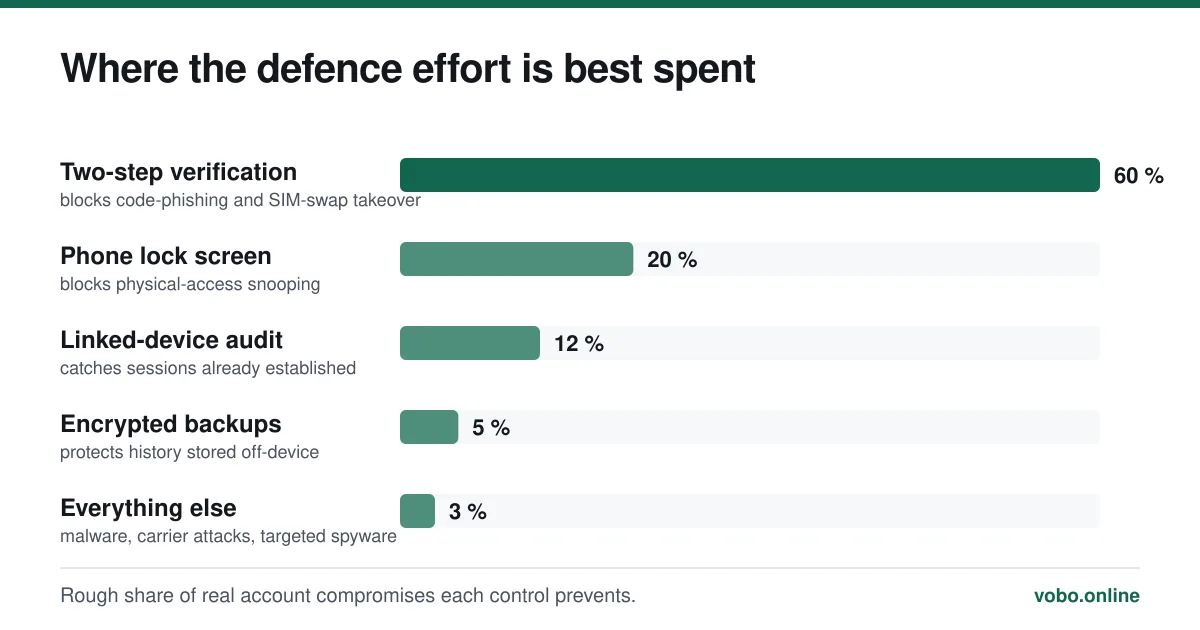
Locking the account down
The five-minute security pass
- Turn on two-step verificationSettings → Account → Two-step verification. Choose a six-digit PIN and add a recovery email. This single step defeats the most common attack completely.
- Audit linked devicesSettings → Linked devices. Log out anything you do not recognise, and anything on a computer you no longer use. Companion devices keep working even when your phone is off, so a forgotten one is a live session.
- Set a real lock screen on the phoneMost WhatsApp 'hacking' in relationships is somebody picking up an unlocked handset. A six-digit passcode or biometrics ends it.
- Turn on the app lockSettings → Privacy → App lock uses fingerprint or Face ID on WhatsApp itself. Chat Lock, covered in how to unlock chats, goes further for individual conversations.
- Enable end-to-end encrypted backupsSettings → Chats → Chat backup → End-to-end encrypted backup. Without this, your backup sits in iCloud or Google Drive protected only by that account's password.
- Ask your carrier for a port-out PINThis is the defence against SIM swapping and it is free. Without it, someone who convinces your operator to move your number gets your SMS codes.
The 'hacking service' industry
Search results for this topic are dominated by sites promising to read any WhatsApp account from the phone number. They fall into three groups, and none of them do what is advertised.
- Straightforward payment scams. You pay, a fake progress bar runs, and there is no result. This is the majority.
- Malware delivery. The 'tool' you download is a trojan, and the account that gets compromised is yours.
- Stalkerware sold to people with physical access. These require installing an app on the target's unlocked phone, which is a completely different threat from what is advertised, and is a criminal offence in most jurisdictions.
The tell is the claim itself. If reading arbitrary WhatsApp accounts from a phone number were possible, it would be worth a fortune to intelligence agencies and would not be sold for $30 on a website with a countdown timer.
Recovering an account that has been taken
Move quickly, and note that you hold the advantage: whoever controls the SIM controls the account.
- Re-register your number in WhatsApp immediately. The fresh code arrives on your phone, and registering logs the attacker out.
- If a two-step PIN you did not set now blocks you, you must wait out the seven-day period WhatsApp enforces. There is no way to shorten it, and no support agent can.
- Once back in, turn on two-step verification and audit linked devices before anything else.
- Message your contacts and tell them the requests for money did not come from you.
- If money was actually taken from someone, that is a fraud matter for the bank and the police, not for WhatsApp.
Nobody at WhatsApp can restore chat history that was lost in the process, and nobody outside WhatsApp can act on an account at all — including us, as the disclaimer sets out.
Frequently asked questions
Can someone read my WhatsApp messages without my phone?
Not through any known remote method. Reading your messages requires either a session on a device you have authorised, physical access to your unlocked phone, or malware installed on it. All three require something more than knowing your number.
How do I know if someone is reading my WhatsApp?
Check Settings → Linked devices first — that lists every session with access, along with when it was last active. An unfamiliar entry is the clearest evidence available. Log it out immediately and turn on two-step verification.
Can WhatsApp itself read my messages?
Not the content of personal chats, which are end-to-end encrypted between devices. WhatsApp does hold metadata — who you message, when, from what device and IP — and it can read messages you report, because reporting sends the recent messages in that chat to WhatsApp deliberately.
Is it safe to click a link sent on WhatsApp?
The same as anywhere else, which is to say treat it with suspicion. Encryption protects the message in transit; it does nothing about what is at the other end of the link. Phishing pages that imitate a WhatsApp login screen are common, and WhatsApp has no web login that asks for your number and code.
Sources
- A Formal Security Analysis of the Signal Messaging Protocol — Journal of Cryptology, 2020 (DOI 10.1007/s00145-020-09360-1)Supports: That the protocol underlying WhatsApp's encryption has been formally analysed and found sound against the modelled attacker classes.
- Staying safe on WhatsApp — WhatsApp Help CenterSupports: WhatsApp's own account of the code-forwarding scam and the advice never to share a registration code.
- How to use two-step verification — WhatsApp Help CenterSupports: The PIN mechanism and the seven-day lockout that applies when a PIN is set without a recovery email.
Related reading
Setup and account
What the WhatsApp 6-digit code is, and why nobody should ever ask you for it
The 6-digit code is WhatsApp's registration key for your phone number. Here is what it does, why it arrives unasked, and what to do when it never turns up.
Privacy and security
Is WhatsApp safe for sending private photos?
Encryption protects the photo in transit. It does nothing about backups, screenshots or the person receiving it — which is where the real risk sits.

Features explained
How to unlock chats on WhatsApp, and how Chat Lock works
Locked chats sit in their own folder and open with your fingerprint or face. Here is how to unlock, unlock with a secret code, and switch it off.
Privacy and security
Does WhatsApp show your phone number, and to exactly whom?
Your number is your WhatsApp account, so anyone you message can see it. Here is precisely who sees it in chats, groups, communities and business accounts.