Why WhatsApp is not working, and how to fix it in order
Most WhatsApp faults are a connection problem, an out-of-date app, or a permission the phone has quietly withdrawn. Check whether other apps can reach the internet, then check for an update, then check WhatsApp's background data and notification permissions. Reinstalling should be last, not first, because it risks your chat history.
Key takeaways
- Work in order. The first three checks resolve the large majority of cases and take under two minutes.
- Full signal bars mean voice coverage, not working data. They are not the same thing.
- A badly wrong system clock breaks WhatsApp's encrypted connection outright, and gives no useful error.
- Reinstall last. Without a current backup it deletes your chat history permanently.
First, identify which failure this is
"Not working" covers four quite different faults with different causes. Working out which one you have saves most of the effort.
| Symptom | Most likely cause | Where to start |
|---|---|---|
| App will not open or crashes | Out-of-date app, or full storage | Update the app; free some space |
| Stuck on 'Connecting…' | No working data connection | Check the connection, then the clock |
| Messages send but show one tick | The recipient's device, not yours | See our piece on messages not delivering |
| Calls fail while chats work | Microphone permission, or a network blocking VoIP | Check permissions, then try mobile data |
| No notifications arriving | Battery optimisation suspending the app | Exempt WhatsApp from battery optimisation |
| Will not download or update | Store account, storage, or an unsupported OS | Check free space and OS version |
If messages are sending but sitting on a single grey tick, this is not your article — that is a problem at the other end, and it is covered in why WhatsApp messages are not delivering.
The triage, in order of likelihood
Work down this list and stop when it works
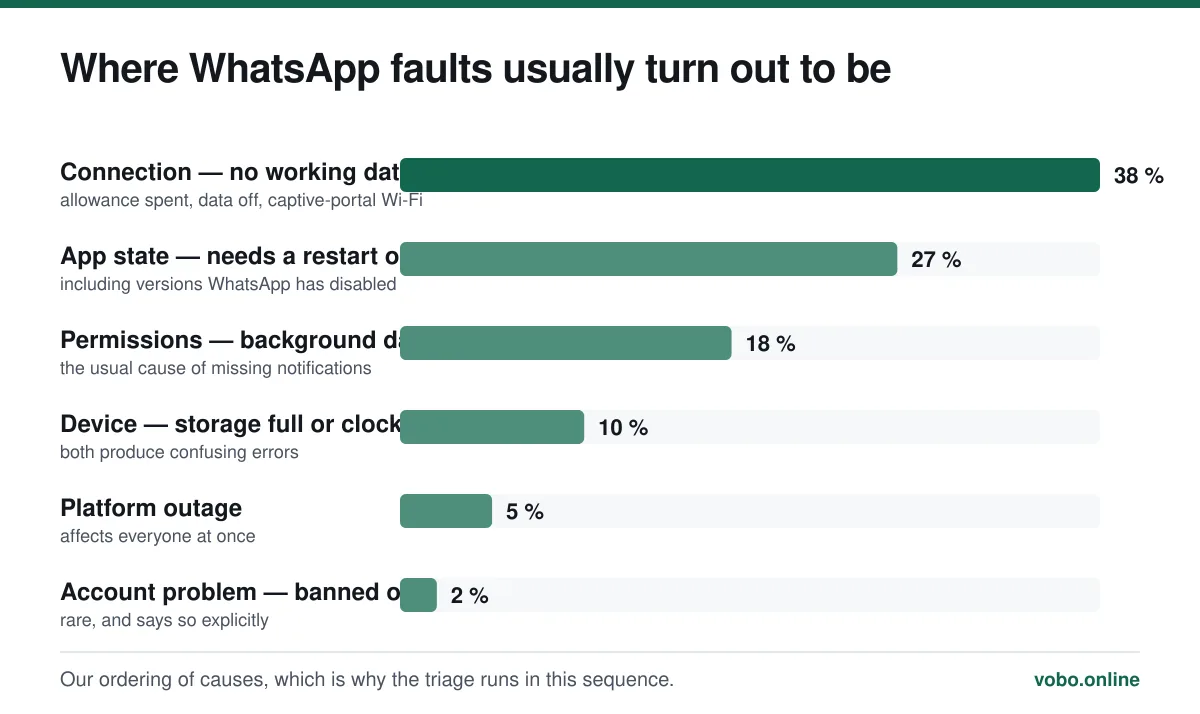
- Confirm you have working internet, not just signalLoad a web page in a browser. Signal bars show voice coverage; data can be exhausted, disabled or blocked while the bars stay full. This is the single most common cause.
- Toggle airplane mode on, then offFifteen seconds, and it forces a fresh network registration. It resolves a surprising proportion of stuck connections without any further work.
- Force-close and reopen WhatsAppSwipe it away from the app switcher and open it again. A suspended process that has lost its connection will not always recover on its own.
- Restart the phoneUnglamorous and genuinely effective. Do this before anything more drastic.
- Check for an app updateWhatsApp disables very old versions outright, and the in-app error is not always clear about it. See how to update WhatsApp.
- Check the date and timeSet it to automatic. A clock that is badly wrong breaks the TLS connection to WhatsApp's servers, and the app reports it as an ordinary connection failure.
- Check background data and battery settingsAndroid: Settings → Apps → WhatsApp → Mobile data, with background data allowed, and exempt it from battery optimisation. iPhone: Settings → WhatsApp → Cellular Data on, and Background App Refresh on.
- Free up storageA phone with no free space cannot write new messages or media. Settings → Storage and data → Manage storage inside WhatsApp shows which chats are hoarding video.
Is WhatsApp actually down?
Outages happen, but they are far rarer than people assume when their own phone misbehaves. The distinguishing feature is scope: an outage affects every chat, for everyone, at the same moment.
- If messages fail to one contact only, it is not an outage. It is their device, or their block list.
- If your messages fail but your browser loads pages fine, and everyone around you is unaffected, it is your device.
- If nobody in the room can send anything, it is probably an outage. Wait rather than troubleshoot.
- Do not reinstall during an outage. You gain nothing and risk your chat history for a fault that will fix itself.
When calls specifically fail
Chats working while calls fail is a distinctive pattern with a short list of causes.
- Microphone or camera permission has been denied. Android: Settings → Apps → WhatsApp → Permissions. iPhone: Settings → WhatsApp, with Microphone and Camera enabled.
- The network blocks VoIP. Some corporate, school and hotel networks do, as do a few countries. Try the same call on mobile data — if it works, the Wi-Fi network is the cause.
- The connection is too slow. Calls need sustained bandwidth in a way that messages do not, so a marginal connection carries text fine and drops calls.
- The other person has a problem, not you. Try calling someone else before assuming anything.
Country-level restrictions on WhatsApp calling specifically, while messaging continues to work, are covered in using WhatsApp internationally.
When notifications do not arrive
This is almost always the phone rather than WhatsApp. Android manufacturers ship aggressive battery optimisation that suspends background apps, and the app then only collects messages when you open it.
Fixing missing notifications
- Exempt WhatsApp from battery optimisationAndroid: Settings → Apps → WhatsApp → Battery → Unrestricted. Samsung, Xiaomi, Huawei and OnePlus each bury this in a different place, and several have a second 'protected apps' list on top of it.
- Check notifications are enabled at OS levelSettings → Apps → WhatsApp → Notifications on Android; Settings → Notifications → WhatsApp on iPhone.
- Check inside WhatsAppSettings → Notifications. Confirm the conversation is not muted — a muted chat still delivers messages, it just does not announce them.
- Turn off Focus or Do Not DisturbiOS Focus modes filter notifications silently and convincingly. Check which Focus is active.
When the phone is simply too old
WhatsApp drops support for old operating systems periodically, and when it does the app stops working entirely rather than degrading. The cut-offs move roughly annually and affect older Android and iOS versions.
The symptom is distinctive: the app refuses to open or update and tells you the version is no longer supported, and the store will not offer a newer build. There is no workaround — the only options are a newer phone or, where the OS can still be updated, updating it. What that looks like in practice is in how to update WhatsApp.
Last resorts, in order
- Clear the app cache — Android only, under Settings → Apps → WhatsApp → Storage → Clear cache. This does not touch your messages.
- Log out any linked devices, at Settings → Linked devices. A stuck companion session occasionally causes odd behaviour on the phone.
- Back up, then reinstall. Verify the backup completed before you uninstall anything.
- If the account itself is the problem — a ban notice, or being logged out repeatedly — that is a different matter, covered in can WhatsApp be hacked.
Frequently asked questions
Why does WhatsApp say 'Connecting' when I have signal?
Because signal bars show voice coverage, not a working data connection. Your data allowance may be spent, mobile data may be off for that app, or you may be on a Wi-Fi network that needs a sign-in page. A badly wrong system clock produces the same symptom.
Will reinstalling WhatsApp delete my messages?
Yes, unless you have a current backup. WhatsApp keeps chat history on the device rather than on its servers. Reinstalling and re-verifying restores from the most recent iCloud or Google Drive backup; with backups switched off, the history is gone permanently.
Why is WhatsApp not sending notifications?
Almost always the phone's battery optimisation suspending the app in the background, particularly on Android. Set WhatsApp to unrestricted battery use, confirm notifications are enabled at OS level, and check the chat is not muted and no Focus mode is active.
How do I know if WhatsApp is down for everyone?
Check whether the failure is universal. An outage affects every chat and every user simultaneously, so if people around you can send messages normally, the problem is your device rather than the platform.
Sources
- About supported operating systems — WhatsApp Help CenterSupports: That WhatsApp stops functioning on operating system versions it no longer supports, with no workaround available.
- How to manage storage and data usage — WhatsApp Help CenterSupports: The in-app storage management tool referenced in the step about freeing space.
- About backing up your chat history — WhatsApp Help CenterSupports: That chat history lives on the device and that reinstalling without a backup destroys it.
Related reading
Troubleshooting
Why WhatsApp messages are not delivering: the seven real causes
One tick means the message reached WhatsApp but not the recipient's phone. Here are the seven causes, ranked by how common they actually are.
Troubleshooting
How to update WhatsApp on iPhone and Android
Updating WhatsApp goes through the App Store or Google Play. Here are the steps, how to automate it, and what to do when the update is refused.

Features explained
How WhatsApp works, from registration to read receipts
A complete plain-language guide to operating WhatsApp: setting up, sending messages, the tick system, calls, groups, backups and linked devices.

Calls, data and cost
Does WhatsApp work without Wi-Fi? Yes — and here is what it costs
WhatsApp works on mobile data with no Wi-Fi at all. This explains what it needs, how much data messages and calls actually use, and what breaks offline.