Does WhatsApp work internationally, and what does it cost abroad?
Yes, in almost every country, and there is no international surcharge — a message to Australia costs exactly what a message to next door costs, which is a few bytes of data. Your number keeps working abroad without a local SIM. The two real complications are the cost of the data connection while roaming, and a small number of countries that block the service.
Key takeaways
- WhatsApp charges nothing extra for international messages or calls. Distance is irrelevant to how it works.
- Your registered number travels with you — you do not re-register abroad, and doing so would be a mistake.
- Roaming data is the actual cost. Use Wi-Fi, or a local eSIM, and turn off media auto-download.
- It is blocked or restricted in a handful of countries, including China, North Korea and periodically elsewhere.
Why there is no international charge
An international SMS or a phone call to another country is expensive because it crosses between carrier networks, and carriers charge each other for the privilege. WhatsApp does not touch that system at all. Your message goes over the internet to WhatsApp's servers and out to the recipient, and the internet does not price by distance.
So the app has no concept of an international message. Sending to a number in Lagos and a number three streets away are identical operations consuming identical amounts of data. This is the single biggest reason WhatsApp took over in countries with large diasporas — it made international contact functionally free at a time when it very much was not.
Using it while you travel
Your account is tied to the number you registered, not to where you are. Fly anywhere and WhatsApp keeps working the moment the phone gets an internet connection. You keep the same chats, the same groups and the same number.
Do not re-register on a local SIM you bought for the trip. Registering a different number creates a different account and moves you off your own — you would lose access to your existing chats unless you migrate back. If you want to use a local SIM for cheap data, put it in the phone and leave WhatsApp registered to your home number. The app does not care which SIM is providing the connection.
| At home | Abroad | |
|---|---|---|
| Your WhatsApp number | Unchanged | Unchanged — it travels with you |
| Message cost from WhatsApp | Nothing | Nothing |
| Data cost | From your normal allowance | Roaming rates, unless your plan includes the country |
| Receiving the verification code | Instant SMS | Roaming SMS can be unreliable; use 'Call me' |
| Calls to landlines | Not possible on WhatsApp | Still not possible — it only calls other WhatsApp users |
| Access to the service | Available | Blocked in a small number of countries |
The cost that actually bites: roaming data
WhatsApp is free. The connection is not. Inside a roaming zone where your allowance applies — most European plans across the EU, many US plans across Canada and Mexico — nothing changes. Outside one, data can be billed at rates that turn a long video call into a genuinely expensive mistake.
Keeping the bill down while travelling
- Turn off media auto-download before you leaveSettings → Storage and data → Media auto-download, set everything to 'No media' on cellular. A busy group downloading video in the background is the classic roaming bill shock.
- Switch on 'Use less data for calls'Same settings screen. It reduces the bitrate, and on a roaming connection the quality trade is worth it.
- Get a local eSIM for dataA travel eSIM is usually far cheaper than roaming and works fine — WhatsApp only needs a connection and does not care which SIM provides it. Keep your home SIM in the phone for the number.
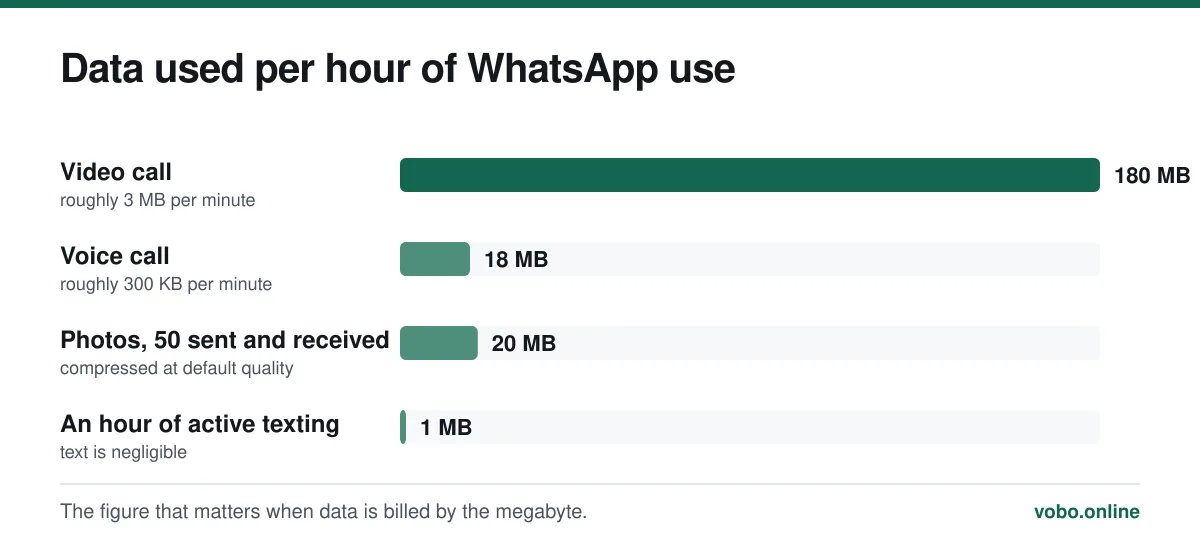
- Prefer voice calls to videoVideo costs about ten times as much data for a conversation that is often no better.
- Do the big things on Wi-FiHotel and café Wi-Fi is free. Backups, photo dumps and video calls belong there.
The full breakdown of what each activity consumes, and how to cut it, is in does WhatsApp work without Wi-Fi.
Countries where it does not work
A small number of governments block WhatsApp, either permanently or during specific periods. The list changes, and it changes without announcement, so treat any published list — including this one — as indicative rather than current.
- China blocks WhatsApp comprehensively. It has been unavailable there since 2017, and the app was removed from the Chinese App Store in 2024.
- North Korea permits no access to the ordinary internet for most residents, so the question does not arise.
- Several countries have imposed temporary blocks around elections or protests. Iran, Ethiopia and others have done so at various points.
- Some countries block WhatsApp voice and video calling specifically while allowing messaging. The United Arab Emirates has historically restricted VoIP calls of this kind.
Where calling specifically is blocked but messaging works, the symptom is a call that rings and immediately fails while chats send normally. That pattern, and the other reasons calls fail, is covered in why WhatsApp is not working.
Moving abroad permanently
If you are emigrating rather than travelling, you eventually face the question of what to do with the number. Two workable options, and one that goes badly.
- Keep the old number alive on a cheap prepaid plan and carry on using it. Simplest, and costs a little each year.
- Migrate to your new local number using WhatsApp's Change Number tool, which moves chats, groups and settings across and tells your contacts. Do this while you still control the old number.
- Let the old number lapse and try to sort it out later. This is the one that fails: you cannot verify a number you no longer hold, and if the operator recycles it, whoever gets it can take the account.
The migration procedure and what it notifies is in how to change your WhatsApp number, and what is recoverable if you have already lost the old number is in using an old number without verification.
Frequently asked questions
Does WhatsApp charge for international calls?
No. WhatsApp charges nothing for any call, domestic or international. The call consumes about 300 KB per minute of data, so the only cost is whatever your data costs — which is why a call abroad on hotel Wi-Fi is free and the same call on roaming data may not be.
Can I use WhatsApp in another country with my home SIM?
Yes. Your account stays registered to your home number wherever you are. You need an internet connection, which can come from roaming data, a local SIM in the same phone, or Wi-Fi.
Do I need a local SIM to use WhatsApp abroad?
Only if you want cheaper data. The account does not need it — and you should not register WhatsApp on the local number, because that creates a separate account and moves you off your own.
Why can't I message a number in another country?
Almost always because the number is not saved in full international format. Save it with a plus sign, the country code, and the number with its leading zero removed. If it still does not appear, that number is not registered on WhatsApp.
Sources
- How to add a contact — WhatsApp Help CenterSupports: The requirement to store international numbers in full international format with the country code and no leading zero.
- How to manage storage and data usage — WhatsApp Help CenterSupports: The media auto-download and 'use less data for calls' settings recommended for roaming.
- About voice and video calls — WhatsApp Help CenterSupports: That calls travel over the internet connection rather than the carrier voice network, which is why there is no international rate.
Related reading
Calls, data and cost
Does WhatsApp work without Wi-Fi? Yes — and here is what it costs
WhatsApp works on mobile data with no Wi-Fi at all. This explains what it needs, how much data messages and calls actually use, and what breaks offline.
Calls, data and cost
Do WhatsApp calls appear on your phone bill?
WhatsApp calls are never itemised on a phone bill because they are not carrier calls. Here is what a bill can and cannot reveal about your WhatsApp use.
Setup and account
How to change your WhatsApp number without losing your chats
The Change Number tool migrates your chats, groups and settings to a new number and tells your contacts. Do it before you lose the old number.
Calls, data and cost
Is WhatsApp free? Yes, and here is what it actually costs you
WhatsApp costs nothing to install or use, and has since 2016. The real costs are data, roaming and what Meta gets from your metadata.