How to see your own WhatsApp number on any device
Open WhatsApp Settings and tap your own name at the top. Your number is printed directly beneath it, in full international format including the country code. There is no separate 'WhatsApp number' — it is simply the phone number you registered the account with.
Key takeaways
- Settings → tap your name. The number is under it, on every platform.
- There is no WhatsApp-specific number. It is your phone number, and nothing else.
- If the number shown is not the one you expect, the account was registered on a different SIM.
- You cannot change the digits without going through the Change Number migration.
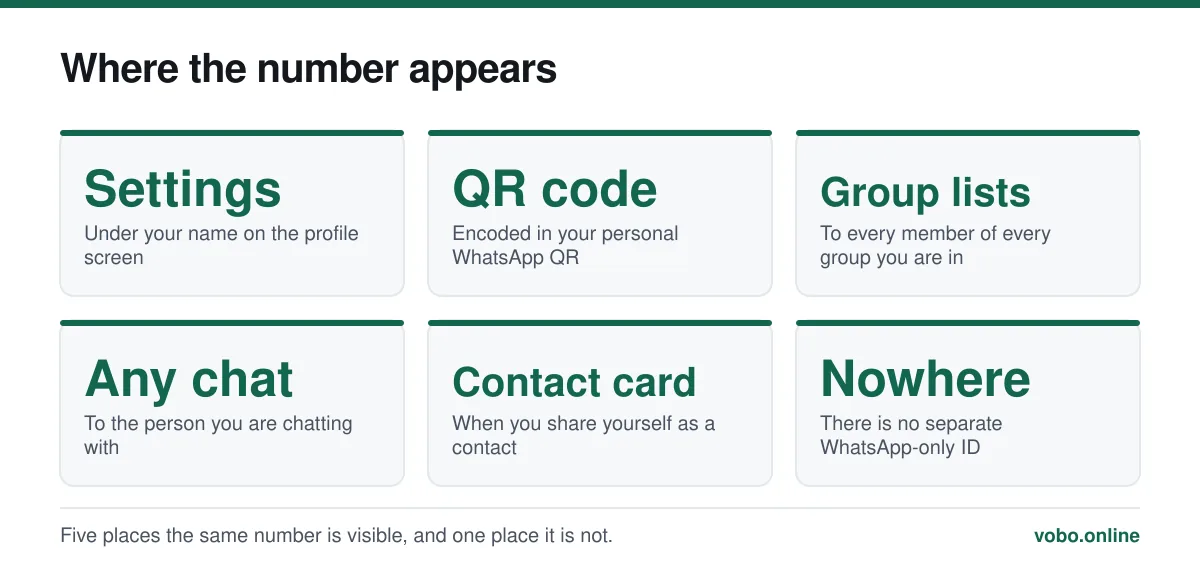
Where the number is shown
Finding your number in the app
- Open WhatsApp SettingsAndroid: three-dot menu at the top right, then Settings. iPhone: the Settings tab at the bottom right.
- Tap your own name and photo at the topThis is the profile row. On some Android builds the number is already shown here without tapping.
- Read the number under your nameIt appears in full international format — for example +44 7700 900123 or +1 202 555 0143 — with the country code included.
On WhatsApp Web and the desktop app, click your avatar in the top-left corner. The profile panel shows the same number.
Other ways to see it
- Your phone's own settings. On iPhone: Settings → Phone → My Number. On Android it varies by manufacturer, but is usually Settings → About phone → SIM status.
- Ask someone to read it back. Anyone you have messaged can see your number in the chat, so a quick message and a reply settles it.
- Your QR code. Settings → tap your name → the QR icon. Sharing that code lets someone add you without either of you typing digits — see scanning a WhatsApp QR code.
- The SIM packaging or your carrier's app, if the number was never saved anywhere on the phone.
Reading the format
WhatsApp always displays numbers in international format, which trips people up because it does not look like the number they are used to writing down.
| Country | How it is written locally | How WhatsApp shows it |
|---|---|---|
| United Kingdom | 07700 900123 | +44 7700 900123 |
| United States | (202) 555-0143 | +1 202 555 0143 |
| India | 098765 43210 | +91 98765 43210 |
| Germany | 0170 1234567 | +49 170 1234567 |
| Brazil | (11) 91234-5678 | +55 11 91234 5678 |
The pattern is consistent: the leading zero used for domestic dialling is dropped and replaced by the country code. This is the same format you need when saving anyone else's international number, and getting it wrong is the usual reason a foreign contact never appears in the app — see using WhatsApp internationally.
When the number is not what you expected
If the number shown in Settings is not the one you thought you were using, the account is registered to a different number. That happens more often than it sounds, usually in one of these ways.
- The phone has two SIMs and the account was registered on the other one.
- You restored a backup from an old phone that used an older number.
- The account was set up by somebody else — a shop assistant, a family member — using whichever SIM was in the phone at the time.
- You changed your carrier number without migrating WhatsApp, so the account is still on the old one. This one has a deadline: if the old number is recycled to someone else, they can take the account.
The fix in all four cases is the same and should not be delayed: use the Change Number tool while you still control the old number, which migrates your chats, groups and settings across. The procedure is in how to change your WhatsApp number.
Sharing your number with someone
Three ways, in increasing order of convenience.
- Read it out. Fine for one person; error-prone for a group.
- Share your contact card. In any chat, tap the attachment icon and choose Contact, then yourself.
- Show your QR code. Settings → your name → the QR icon. They scan it and you are added, with no digits typed and no transcription errors.
Who else can see it
Everyone you message, and every member of every group you belong to. This is not a setting and cannot be changed. If that is a surprise, the full account of who sees what is in does WhatsApp show your phone number, and the things you can actually hide are covered in how to hide your number.
One thing worth doing while you are on the profile screen: check that your name and photo are what you intend strangers to see, since those follow different visibility rules from the number. Both are covered in how to change your WhatsApp name.
Frequently asked questions
What is my WhatsApp number?
It is your phone number — the one you registered the account with. WhatsApp does not issue a separate identifier. You will find it in Settings, printed under your name on the profile screen.
Can I have a WhatsApp number that is different from my phone number?
Only by registering the account on a different phone number, such as a second SIM. There is no way to have WhatsApp display a number other than the one the account is registered to.
How do I find my WhatsApp number without opening the app?
Check your phone's own settings: iPhone under Settings → Phone → My Number, or Android under Settings → About phone → SIM status. That gives you the SIM's number, which is the WhatsApp number provided the account was registered on that SIM.
Why does WhatsApp show my number with a plus and country code?
Because it works internationally and needs an unambiguous format. The plus and country code replace the leading zero used for domestic dialling. The digits are the same number, written the way the global telephone system expects.
Sources
- How to edit your profile — WhatsApp Help CenterSupports: That the profile screen reached from Settings displays the registered phone number beneath the account name.
- How to add a contact — WhatsApp Help CenterSupports: The international number format WhatsApp uses and the QR-code method of sharing a number without typing it.
Related reading
Setup and account
How to change your WhatsApp number without losing your chats
The Change Number tool migrates your chats, groups and settings to a new number and tells your contacts. Do it before you lose the old number.
Privacy and security
Does WhatsApp show your phone number, and to exactly whom?
Your number is your WhatsApp account, so anyone you message can see it. Here is precisely who sees it in chats, groups, communities and business accounts.
Features explained
How to scan a WhatsApp QR code, and the scam that abuses it
WhatsApp uses QR codes for two different jobs: adding a contact and linking a device. Here is how to scan each, and why one of them is dangerous.
Calls, data and cost
Does WhatsApp work internationally, and what does it cost abroad?
WhatsApp works in almost every country with no extra charge, because messages travel over the internet. Here is what changes abroad and where it is blocked.