How to hide your phone number on WhatsApp — and what you actually can hide
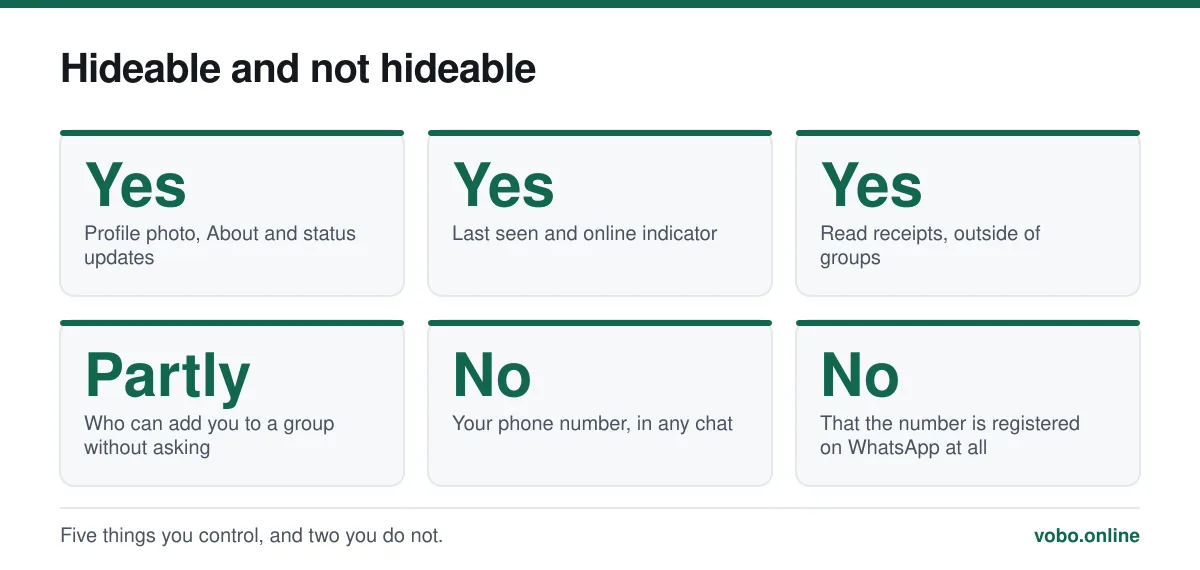
There is no setting that hides your phone number from someone you are chatting with, because the number is the account identifier. What you can hide is your profile photo, About text, last seen, online status and status updates, and you can stop strangers adding you to groups. If you genuinely need your personal number kept out of a conversation, the only real solution is a second number.
Key takeaways
- No setting, app or trick hides the number from a chat participant. Anything claiming otherwise is wrong or malicious.
- Six privacy settings do work, and most people have never opened them.
- Restricting who can add you to groups is the highest-value change, because groups are where numbers leak.
- A cheap prepaid SIM is the only genuine separation between your identity and your messaging.
Start with what is not possible
WhatsApp uses your phone number as the account identifier, the way an email address identifies an email account. Every message you send carries it, and the recipient's app needs it to route a reply. There is nothing to hide it behind and no setting that removes it.
That applies without exception to: anyone you message directly, every member of any group you join, any business account you contact, and anyone who was already in a group with you. The reasoning and the full visibility map are in does WhatsApp show your phone number.
What you genuinely can control
| Setting | Options | Worth changing? |
|---|---|---|
| Last seen and online | Everyone / My contacts / My contacts except / Nobody | Yes — the single most-noticed one |
| Profile photo | Everyone / My contacts / My contacts except / Nobody | Yes — otherwise anyone with your number sees your face |
| About | Same four options | Yes, if you have written anything real in it |
| Status | My contacts / My contacts except / Only share with | Yes, if you post status updates at all |
| Read receipts | On or off | Personal preference; turning it off hides everyone else's from you too |
| Groups | Everyone / My contacts / My contacts except | Yes — the highest-value setting on the list |
Setting all six in two minutes
- Open Settings → PrivacyAndroid: three-dot menu → Settings → Privacy. iPhone: Settings tab → Privacy. The list is identical.
- Set 'Last seen and online'Choose My Contacts or Nobody. Setting last seen to Nobody unlocks the option to set online status to 'Same as last seen', which stops the live green indicator others watch.
- Set 'Profile photo' to My ContactsLeft on Everyone, your photo is visible to anyone who has your number — including people who took it from a group member list.
- Set 'About' to My ContactsA small field people fill with real information more often than they realise.
- Set 'Groups' to 'My contacts'Strangers must then send you an invite rather than adding you directly. This is what stops your number appearing in rooms you never chose to join.
- Decide on read receiptsTurning them off is reciprocal — you stop seeing other people's blue ticks too. It has no effect in groups, where read receipts cannot be disabled.
The group setting is the one that matters
Numbers rarely leak through direct messages, because you chose to send those. They leak through groups. Join one 200-member neighbourhood group and your number is on 199 other phones, most belonging to people you will never meet.
Worse, several documented scam operations work by joining large groups with public invite links purely to harvest the member list, then messaging everybody individually. Setting Groups to 'My contacts' means a stranger has to send you an invitation you can decline, rather than simply adding you.
If you are already in large groups you do not use, leaving them does not retract your number from anyone who already has it — but it stops future members from getting it.
The second number, which is the real answer
If the goal is that a particular set of people never get your personal number, the only method that achieves it is registering a different number. Everything else is decoration.
A prepaid SIM costs a few pounds or dollars, works indefinitely, and gives you a number you can hand out for marketplace listings, community groups and one-off arrangements. On a modern phone with an eSIM slot, or using WhatsApp's multi-account feature, both accounts live on the same device.
Virtual and VoIP numbers are less reliable — WhatsApp blocks many of those ranges, and a provider can recycle a number to somebody else who could then take the account. The honest comparison is in using WhatsApp without a phone number.
What blocking does and does not do
Blocking someone stops their messages and calls reaching you, and hides your last seen, online status, profile photo, About and status updates from them. It does not retract your phone number — they already have it — and it does not remove you from any group you both belong to.
It is also silent: the blocked person gets no notification, and their messages simply show one tick forever. That is why a single tick is not evidence of being blocked, since an off phone produces the same thing. Managing the block list is covered in seeing blocked numbers in WhatsApp.
Businesses and the number you give them
Messaging a business account hands that business your number in an exportable form. What they may do with it afterwards is governed by their own privacy policy and by data protection law where you live, not by WhatsApp.
Under UK and EU GDPR they need a lawful basis to send you marketing and you can object to it. In practice, assume that asking a shop whether something is in stock puts your number in their customer database, and use your second number for that if you have one.
Frequently asked questions
Can I hide my phone number from a group?
No. Every member of a group can see the number of every other member by tapping the member list. The only way to keep your number out of a group is not to be in it, or to be in it under a different number.
Does hiding my last seen hide my phone number?
No. Last seen, online status, profile photo and About are separate settings that control profile information. None of them affects the phone number, which is always visible to anyone you are in a chat with.
Can I message someone on WhatsApp anonymously?
Not on WhatsApp. Any message you send reveals the number you sent it from. Signal supports usernames that let people contact you without knowing your number, which is the closest mainstream equivalent.
Do those 'hide my WhatsApp number' apps work?
No. At best they do nothing. Many are modified WhatsApp clients that harvest account credentials, and using one also risks a ban from WhatsApp, which would cost you your chat history.
Sources
- How to change your privacy settings — WhatsApp Help CenterSupports: The complete list of available privacy controls and their options, confirming that the phone number is not among them.
- About blocking and reporting contacts — WhatsApp Help CenterSupports: What blocking hides from the blocked person, and that blocking is not signalled to them.
Related reading
Privacy and security
Does WhatsApp show your phone number, and to exactly whom?
Your number is your WhatsApp account, so anyone you message can see it. Here is precisely who sees it in chats, groups, communities and business accounts.
Setup and account
How to use WhatsApp without a mobile phone number
You cannot skip verification, but you can register WhatsApp on a landline or a spare number. Here is what works, what fails, and the honest limits.
Privacy and security
How to see your blocked numbers on WhatsApp, and what blocking does
Your block list is at Settings → Privacy → Blocked contacts. Here is what blocking hides, what it does not, and what happens when you unblock.
Features explained
What 'online', 'last seen' and popup notifications actually mean
WhatsApp's status indicators get over-read constantly. Here is what each one genuinely proves, and what it does not.