How to change your WhatsApp number without losing your chats
Use Settings → Account → Change number, which moves your chats, groups and settings to the new number and verifies it with a fresh six-digit code. Do it while you still control the old number — once it is disconnected or reassigned, there is no supported way to migrate, and your history stays stranded on an account you can no longer verify.
Key takeaways
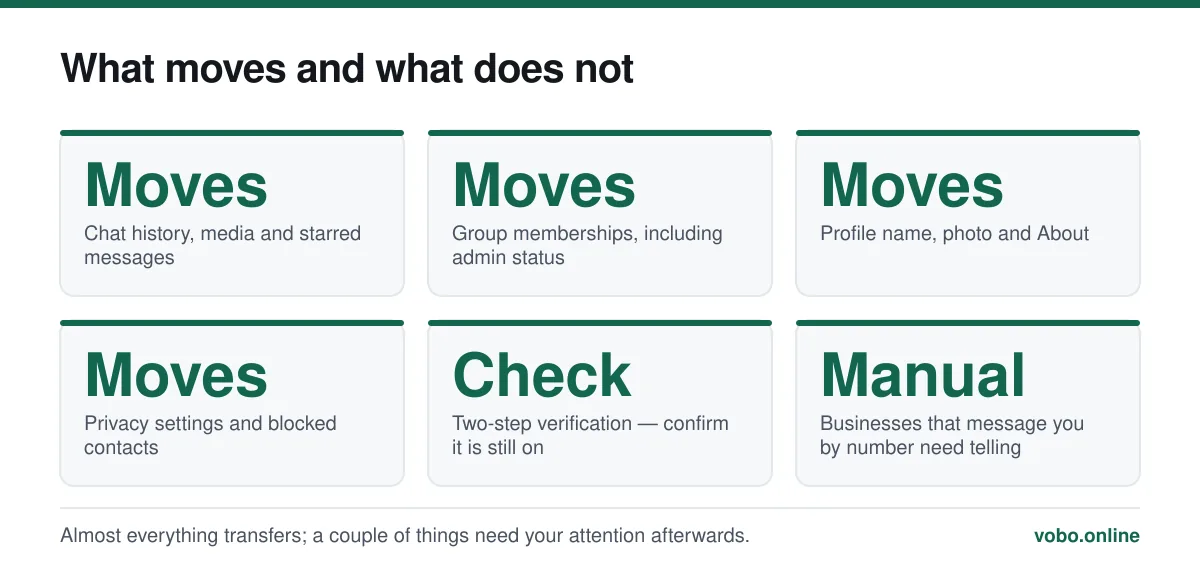
- Change Number migrates everything. Registering the new number from scratch instead starts you empty.
- You must still be able to receive a code on the new number; the old one does not need to work.
- You choose who gets notified: nobody, your contacts, or a chosen list. Groups are told either way.
- Do this before cancelling the old SIM. Afterwards there is no route back.
Why this is a migration rather than an edit
Your phone number is not a field on your WhatsApp account. It is the account identifier. Changing it means moving everything to a new identity, which is why there is a dedicated tool rather than an editable box.
The reasoning behind that design, and its other consequences, are in does WhatsApp need a phone number.
Before you start
- The new number must be in the phone, or at least reachable, so it can receive the six-digit code.
- The old number does not need to work. You are proving control of the new one, not the old.
- Run a backup first: Settings → Chats → Chat backup → Back up now. It is not strictly required, and it costs nothing to have.
- Do not register the new number as a fresh account. That creates a second, empty account and leaves your history behind.
Changing the number
The migration, step by step
- Open Settings → Account → Change numberOn Android this is under the three-dot menu → Settings; on iPhone the Settings tab. Read the explanatory screen and tap Next.
- Enter the old number, then the new oneBoth in full international format, country code first and no leading zero. Getting this wrong is the usual cause of a failed migration.
- Choose who to notifyThree options: all your contacts, only the contacts you have chats with, or a custom list. You can also choose nobody, though groups are informed regardless.
- Verify the new numberA six-digit code arrives by SMS to the new number. If it does not, wait for the countdown and use 'Call me'. This is the ordinary registration code — never share it.
- Wait for the migration to completeChats, groups, settings and your profile move across. Do not close the app while it runs.
- Confirm and turn two-step verification back onCheck your groups and a few chats are present, then confirm two-step verification is still enabled on the new number.
Who actually gets told
The notification options are more nuanced than people expect, and the group behaviour is the part that surprises.
| Choice | Who is told | What they see |
|---|---|---|
| All contacts | Everyone in your phone book on WhatsApp | A system message with your old and new number |
| Contacts you have chats with | Only people you have actually messaged | The same system message, in that chat |
| Custom | A list you select | The same message, only to those people |
| Nobody | No individual notification | Groups still show a system message about the change |
Changing the number and the phone at once
Do them separately and in this order, because doing both at once is where people lose history.
- On the old phone with the old number, run the Change Number migration to the new number.
- Confirm everything is present on the old phone under the new number.
- Back up: Settings → Chats → Chat backup → Back up now.
- Set up the new phone, verify the new number, and accept the restore offer when it appears.
- Only then remove WhatsApp from the old phone.
The restore offer appears once, during first launch. Skip it and the only route back is to reinstall so setup runs again — see how to create a WhatsApp account.
When it does not work
- The code does not arrive on the new number — check the format, then use the voice-call option after the countdown. Roaming SMS is unreliable, and the voice call usually gets through.
- 'This number is already registered' — the new number has its own WhatsApp account. Delete that account first, from that number's device, at Settings → Account → Delete my account.
- The migration stalls — do not force-close mid-run. Ensure a stable connection and let it finish.
- Contacts still see the old number — they have you saved under it. They need to update their own phone book; nothing on your side changes what a saved contact displays. This is the same mechanism described in how to change your WhatsApp name.
Afterwards
A few loose ends worth handling in the first week.
- Tell businesses that message you on WhatsApp — banks, delivery services, appointment reminders. They will not see the system message.
- Check that groups you administer still show you as admin.
- Confirm two-step verification is on, and that the recovery email is still correct.
- Keep the old SIM active for a few weeks if you can, in case something was missed.
Frequently asked questions
Will I lose my chats if I change my WhatsApp number?
Not if you use the Change Number tool, which migrates chats, groups, media and settings to the new number. You lose them if you instead register the new number as a fresh account, which starts empty.
Does WhatsApp tell people I changed my number?
You choose whether individual contacts are notified — all of them, only those you chat with, a custom list, or nobody. Groups are always told with a system message, regardless of your choice.
Can I change my WhatsApp number without the old SIM?
Yes. The migration verifies the new number, not the old one, so the old SIM does not need to be in the phone or even active. What you cannot do is migrate after the old number has been reassigned and someone else has registered it.
What happens to my old WhatsApp number after I change it?
The account no longer exists on it. If the carrier later reassigns that number to somebody else, they can register a fresh WhatsApp account on it — they will not inherit your chats, because those moved with you.
Sources
- How to change your phone number — WhatsApp Help CenterSupports: The Change Number procedure, the notification options, and that group members are informed regardless of the choice made.
- About backing up your chat history — WhatsApp Help CenterSupports: The backup and restore sequence recommended when changing number and phone at the same time.
Related reading
Setup and account
Can you use an old WhatsApp number without verification?
No — verification cannot be skipped, and nobody at WhatsApp can waive it. Here is what can genuinely be recovered when the old number is gone.

Setup and account
Does WhatsApp need a phone number? Yes, and here is why it is built that way
WhatsApp requires a phone number that can receive a code — there is no email or username signup. Here is what qualifies, what does not, and why.

Setup and account
How to create a WhatsApp account, step by step
Setting up WhatsApp takes about three minutes. Here is the whole process on iPhone and Android, plus the two settings worth changing immediately.

Setup and account
How to see your own WhatsApp number on any device
Your WhatsApp number is shown under your name in Settings. Here is where to find it on iPhone, Android, Web and desktop, and what it is not.