What 'online', 'last seen' and popup notifications actually mean
'Online' means WhatsApp is open and connected on that person's phone. It does not mean they have seen your message, are ignoring you, or are even looking at the screen. 'Last seen' is the timestamp of when the app was last connected, and a popup notification is an Android display setting that shows a message as a window over whatever you are doing.
Key takeaways
- Online means the app is connected. It says nothing about attention, and nothing about you specifically.
- Last seen updates when the app connects, which can happen in a pocket without anyone touching it.
- Blue ticks are the only indicator that actually means a message was opened.
- Hiding your last seen also hides everyone else's from you. The setting is reciprocal by design.
'Online'
It means WhatsApp is currently open in the foreground on that person's device and connected to the internet. That is the entire meaning.
It does not mean they are in your chat. It does not mean they have read your message. It does not mean they are choosing not to reply. Someone can be online because they are replying to somebody else, because the app is sitting open on a table, or because they opened it, saw nothing interesting, and put the phone down without closing it.
This indicator causes more unnecessary friction between people than anything else in the app, because it is read as evidence of a decision when it is evidence of a network connection.
'Last seen'
A timestamp of when WhatsApp was last connected on that device. Also frequently over-read.
It updates whenever the app connects — which includes background refreshes on some configurations, so a last seen of 03:14 does not mean somebody was awake at 03:14. It is not a log of activity, and it does not tell you what they did while connected.
| Indicator | Proves | Does not prove |
|---|---|---|
| Online | The app is open and connected | That they saw your message or are ignoring it |
| Last seen at 14:02 | The app connected at 14:02 | That a person was using the phone at 14:02 |
| Typing… | Text is being entered in your chat right now | That the message will be sent |
| Recording audio… | A voice note is being recorded | That it will be sent |
| Two blue ticks | The chat was opened with your message visible | That it was read carefully, or will be answered |
| No last seen shown | They have restricted it, or you are blocked | Which of those two it is |
'Typing…' and 'recording audio…'
These are live and specific to your chat: text is being entered, or a voice note is being recorded, right now. They are the most genuinely informative indicators WhatsApp has.
They are also the most fragile. The indicator vanishing does not mean the message was deleted or reconsidered — pausing for a few seconds, switching apps, or a brief connection drop all clear it. Watching someone start and stop typing is not the conversation people imagine it is.
Popup notifications
A popup notification is an Android display setting, not a WhatsApp feature with hidden meaning. It shows an incoming message as a window over whatever is on screen, rather than only in the notification shade.
The setting lives at Settings → Notifications inside WhatsApp on Android, where the options historically ranged from no popup to always showing one. On newer Android versions this is largely handled by the operating system's own notification categories instead, and iPhone has no equivalent WhatsApp-level setting — banners are controlled by iOS.
Adjusting how notifications appear
- Android, inside WhatsAppSettings → Notifications. Message notifications, group notifications and call notifications each have their own tone, vibration and popup behaviour.
- Android, at OS levelSettings → Apps → WhatsApp → Notifications. Newer versions control banner style, lock screen visibility and priority here rather than in the app.
- iPhoneSettings → Notifications → WhatsApp. Choose banner style, whether previews are shown, and lock screen behaviour.
- Hide message previewsInside WhatsApp: Settings → Notifications → Show preview, off. Worth doing if your phone sits face-up on a desk.
If notifications are not appearing at all, that is a different problem — almost always battery optimisation suspending the app — and it is covered in why WhatsApp is not working.
Hiding your own status
You have real control here, with one design quirk worth knowing about.
Controlling what others see
- Settings → Privacy → Last seen and onlineSet last seen to Everyone, My contacts, My contacts except, or Nobody.
- Then set the online optionSetting last seen to anything other than Everyone unlocks a second choice: show online status to Everyone, or 'Same as last seen'. The latter is what actually hides the green indicator.
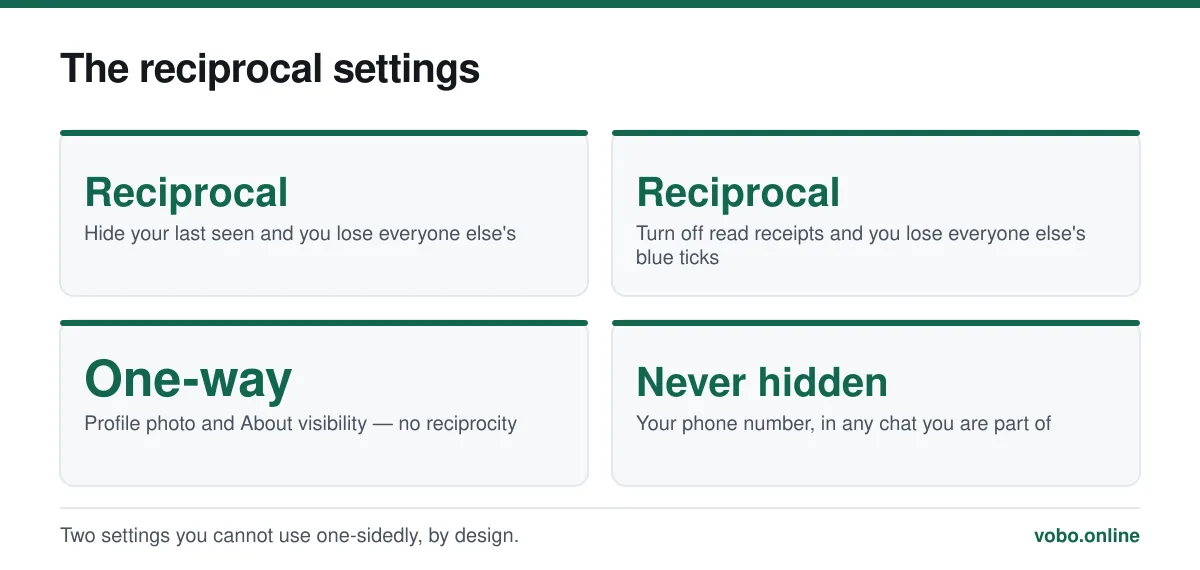
- Understand the reciprocityIf you hide your last seen, you cannot see anybody else's. WhatsApp enforces this deliberately, so the setting cannot be used one-sidedly.
- Consider read receipts separatelySettings → Privacy → Read receipts. Turning them off hides your blue ticks and everyone else's from you. It has no effect in groups, where read receipts cannot be disabled.
When someone's status disappears entirely
No last seen, no online, no profile photo. Three explanations, indistinguishable from the outside: they have restricted those settings, they have not saved you and have restricted to contacts, or they have blocked you.
WhatsApp is deliberate about this ambiguity — blocking is designed to be undetectable, which is what makes it safe to use. What blocking actually does is covered in seeing blocked numbers in WhatsApp, and the related question of a message stuck on one tick is in why messages are not delivering.
Apps claiming to track when a contact is online, or to alert you when they come online, work by polling constantly and logging it. They are widely available, they are a form of surveillance, and several have been removed from app stores for exactly that reason. They also require your account credentials, which is its own problem — see can WhatsApp be hacked.
Frequently asked questions
Does 'online' mean someone is reading my message?
No. It means WhatsApp is open and connected on their phone. They may be messaging somebody else entirely. Only two blue ticks indicate that your specific message was opened.
Can I hide that I am online on WhatsApp?
Yes. Set Settings → Privacy → Last seen and online to something other than Everyone, then set online status to 'Same as last seen'. Note that hiding your last seen also stops you seeing anyone else's.
Why can I not see someone's last seen?
Either they have restricted it in their privacy settings, or they have blocked you. There is no way to distinguish the two, and that ambiguity is intentional.
What is a popup notification on WhatsApp?
An Android display option that shows an incoming message as a window over whatever is on screen, rather than only in the notification shade. It carries no hidden meaning about the message or the sender.
Sources
- About last seen and online — WhatsApp Help CenterSupports: The definitions of online and last seen, the settings that control them, and the reciprocity rule.
- About message information — WhatsApp Help CenterSupports: That blue ticks, not online status, are the indicator that a message was opened.
Related reading
Troubleshooting
Why WhatsApp messages are not delivering: the seven real causes
One tick means the message reached WhatsApp but not the recipient's phone. Here are the seven causes, ranked by how common they actually are.
Privacy and security
How to see your blocked numbers on WhatsApp, and what blocking does
Your block list is at Settings → Privacy → Blocked contacts. Here is what blocking hides, what it does not, and what happens when you unblock.
Privacy and security
How to hide your phone number on WhatsApp — and what you actually can hide
You cannot hide your number from someone you message, but you can control almost everything else. Here is what works, what does not, and the second-number option.

Features explained
How WhatsApp works, from registration to read receipts
A complete plain-language guide to operating WhatsApp: setting up, sending messages, the tick system, calls, groups, backups and linked devices.