How to see your blocked numbers on WhatsApp, and what blocking does
Go to Settings → Privacy → Blocked contacts to see everyone you have blocked. Blocking stops their messages and calls reaching you and hides your last seen, photo, About and status updates from them — silently, with no notification. Messages they send while blocked are never delivered, and unblocking does not deliver them retrospectively.
Key takeaways
- The list lives at Settings → Privacy → Blocked contacts, on every platform.
- Blocking is silent. Their messages simply sit on one tick forever.
- Messages sent while blocked are lost, not queued. Unblocking does not release them.
- Blocking does not remove you from shared groups, where they can still see and message the group.
Finding the block list
Viewing everyone you have blocked
- Open WhatsApp SettingsAndroid: the three-dot menu, then Settings. iPhone: the Settings tab in the bottom bar.
- Tap PrivacyThe same screen that holds last seen, profile photo and read receipts.
- Scroll to 'Blocked contacts'It shows a count. Tap it for the full list, with names for saved contacts and raw numbers for everyone else.
- Tap a name to unblockTap the entry and choose Unblock. On Android you can also swipe. There is no confirmation step, so tap carefully.
On WhatsApp Web and the desktop app the same list appears under Settings → Privacy → Blocked, and changes sync both ways within seconds.
What blocking actually does
| What happens | |
|---|---|
| Their messages to you | Never delivered. They see one tick indefinitely |
| Their calls to you | Do not connect and do not ring your phone |
| Your last seen and online | Hidden from them |
| Your profile photo and About | Hidden from them; they see the grey placeholder |
| Your status updates | Not visible to them |
| Are they told? | No. There is no notification of any kind |
| Existing chat history | Stays in both people's chat lists |
| Shared groups | Unaffected — you both remain members and both see the group |
Why it is deliberately silent
WhatsApp gives the blocked person no signal at all — no notice, no error, no distinguishable behaviour. Their messages behave exactly as they would if your phone were switched off.
This is a safety decision rather than an oversight. A blocking feature that announces itself is a blocking feature that provokes a reaction, which matters a great deal to anyone blocking someone they are frightened of. The cost is the ambiguity that fuels endless speculation in the other direction.
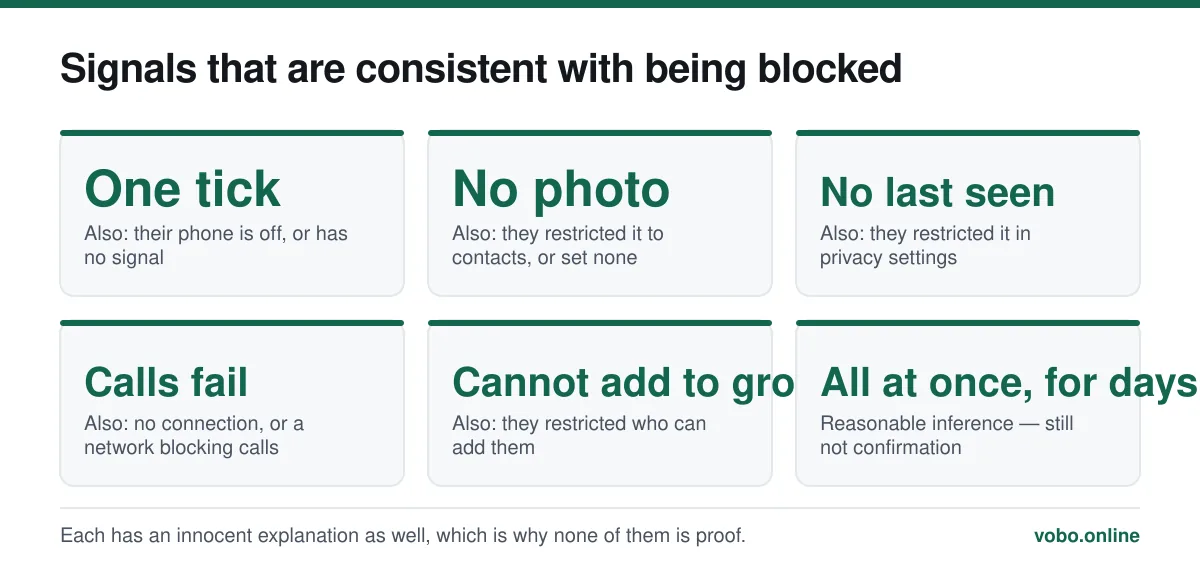
The consequence for the person on the other end is that there is no reliable test. A permanent single tick, a missing profile photo and an absent last seen are each consistent with a blocked contact and with several innocent explanations. That is unpacked in why WhatsApp messages are not delivering.
How to block someone
- From the chat: tap the contact's name at the top, scroll to the bottom, and choose Block.
- From the chat list: long-press the chat, then use the menu.
- From Settings: Privacy → Blocked contacts → Add, then pick from your contacts.
- For an unknown number that has messaged you: WhatsApp offers Block and Report directly in the chat, before you reply.
Reporting is separate from blocking and can be done together. Reporting sends the most recent messages in that chat to WhatsApp for review — which is one of the few circumstances in which message content becomes visible to the company, since it is you who chose to send it.
Unblocking, and what does not come back
Unblock from the block list, or from the chat itself. Once unblocked, they can message and call you normally and can see your profile again according to your ordinary privacy settings.
What does not come back is anything sent during the block. Those messages were not held anywhere — they were never delivered and are not queued. This is the single most common misunderstanding about unblocking, and there is no setting or trick that recovers them.
Blocked numbers you do not recognise
A block list full of unfamiliar international numbers is normal if you have been in large groups — scam operations harvest member lists and message everyone individually. There is no harm in leaving them blocked, and no benefit in unblocking them out of curiosity.
The underlying exposure is that your number is visible to every member of every group you join. Limiting that is covered in does WhatsApp show your phone number and how to hide your number, and the single most effective control is restricting who can add you to groups in the first place.
For messages from strangers that are not obviously spam, WhatsApp shows Block and Report options above the reply field before you engage at all — which is the right moment to use them.
Frequently asked questions
Does someone know when I block them on WhatsApp?
No. There is no notification and no error message. Their messages show a single tick indefinitely, exactly as they would if your phone were switched off, and their calls simply fail to connect.
Will I receive messages sent while someone was blocked, after I unblock them?
No. Messages sent during a block are never delivered and are not stored anywhere for later release. Unblocking restores normal delivery from that point onward only.
Can a blocked contact still see me in a group?
Yes. Blocking only affects direct messages and calls. In a shared group you both remain members, both see the group's messages, and both can post to it.
How do I know if someone blocked me on WhatsApp?
You cannot know for certain. A permanent single tick combined with no profile photo, no last seen and failing calls is suggestive, but each of those has an innocent explanation. WhatsApp deliberately provides no way to confirm it.
Sources
- About blocking and reporting contacts — WhatsApp Help CenterSupports: The location of the block list, what blocking hides, that no notification is sent, and that group membership is unaffected.
- How to change your privacy settings — WhatsApp Help CenterSupports: The Privacy screen that contains Blocked contacts alongside the other visibility controls.
Related reading
Troubleshooting
Why WhatsApp messages are not delivering: the seven real causes
One tick means the message reached WhatsApp but not the recipient's phone. Here are the seven causes, ranked by how common they actually are.
Features explained
What 'online', 'last seen' and popup notifications actually mean
WhatsApp's status indicators get over-read constantly. Here is what each one genuinely proves, and what it does not.
Privacy and security
How to hide your phone number on WhatsApp — and what you actually can hide
You cannot hide your number from someone you message, but you can control almost everything else. Here is what works, what does not, and the second-number option.
Privacy and security
Does WhatsApp show your phone number, and to exactly whom?
Your number is your WhatsApp account, so anyone you message can see it. Here is precisely who sees it in chats, groups, communities and business accounts.