Does WhatsApp need a phone number? Yes, and here is why it is built that way
Yes — WhatsApp needs a phone number that can receive an SMS or an automated voice call, because the number is the account and there has never been a username or an email signup. A landline works, since WhatsApp will read the code out loud. Most VoIP numbers do not, because WhatsApp blocks the ranges it associates with bulk signups.
Key takeaways
- There is no email or username registration path. The requirement is architectural, not a setting somebody can waive.
- A landline is a valid option — choose 'Call me' and an automated voice reads the six digits aloud.
- VoIP and virtual numbers are hit-and-miss by design; WhatsApp blocks ranges it associates with bulk registration.
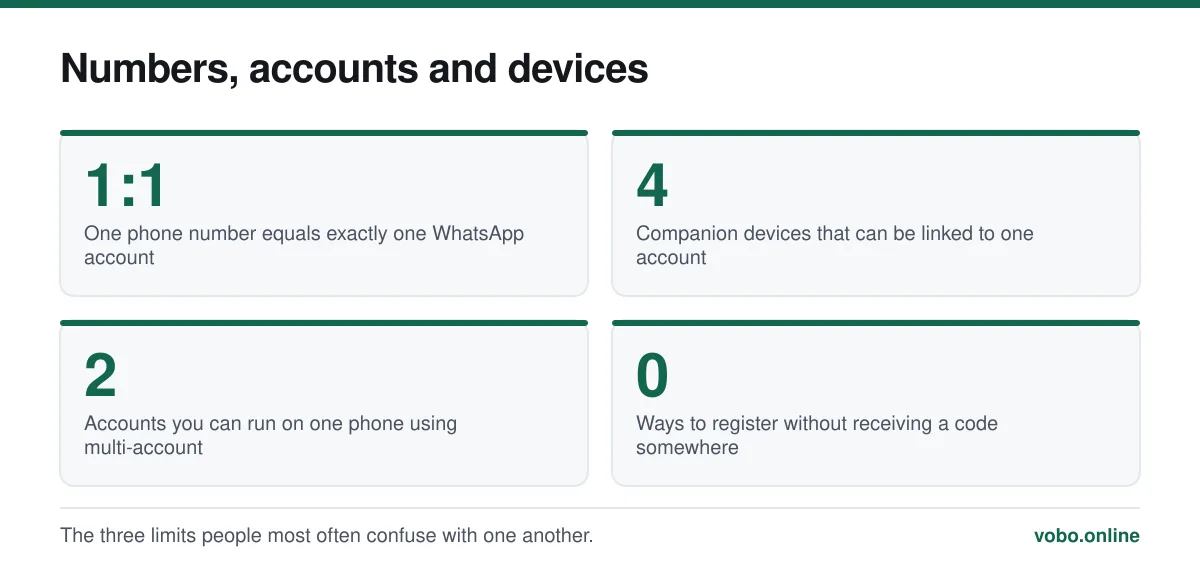
- One number equals one account. Two accounts need two numbers, though modern WhatsApp supports both on one phone.
The requirement, stated precisely
To register WhatsApp you need a telephone number you can receive a message or a call on, right now, during setup. WhatsApp sends a six-digit code to it and you type the code back. That is the only identity check there is, and it is the whole of it.
There is no alternative route. No email signup, no Google or Apple sign-in, no username, no QR-based enrolment from another account. Requests to skip verification come up constantly and the answer is always the same: the verification is not a step in front of the account, it is what creates the account.
What the code does, why it is dangerous to share, and what to do when it does not arrive are covered in what the six-digit code is for.
Why WhatsApp designed it this way
Three reasons, and they are worth understanding because they explain why the requirement is unlikely to disappear.
- It removed the contact-list problem. Because everyone's identifier was already in everyone's phone book, WhatsApp launched with no friend requests, no search and no directory. Install it and your contacts are already there. That single decision explains a large part of how fast it spread.
- It raises the cost of spam. A phone number costs money and is tied to a SIM, a network and often an identity check. An email address costs nothing and can be generated in bulk. Requiring a number makes mass account creation expensive rather than free.
- It makes account recovery simple. Lost your phone? Put the SIM in a new one, re-register, and the account comes back. There is no password to reset because there is no password.
What counts as a valid number
| Number type | Works? | Notes |
|---|---|---|
| Mobile number with a SIM | Yes | The intended path; SMS code arrives in seconds |
| eSIM on a modern phone | Yes | Functionally identical to a physical SIM |
| Landline | Yes | Use the 'Call me' option; a voice reads the code aloud |
| Office desk phone or PBX extension | Usually | Needs to receive an external automated call and reach a human |
| Google Voice and similar VoIP | Sometimes | Works for some numbers, refused for others, and can stop working later |
| Free online 'receive SMS' numbers | Effectively never | These ranges are blocked, and the number is public anyway |
| A number already on WhatsApp elsewhere | Yes, but | Registering moves the account to the new device and logs the old one out |
Registering with a landline
This is the supported route for anyone without a mobile number, and it works properly rather than as a trick.
Registering a WhatsApp account on a landline
- Install WhatsApp on the phone or tablet you will useThe device needs an internet connection, but it does not need a SIM card and does not need to be the phone receiving the call.
- Enter the landline number in full international formatCountry code first, no leading zero. A UK landline written 020 7946 0000 becomes +44 20 7946 0000.
- Wait out the SMS countdownWhatsApp tries SMS first and it will fail, because landlines cannot receive text messages. The 'Call me' button only becomes available once the timer expires.
- Choose 'Call me' and answer the landlineAn automated voice reads the six digits, twice. Have a pen ready — it does not repeat indefinitely.
- Enter the code and set up the profileFrom here it is an ordinary account. Set two-step verification straight away, because a landline is more exposed to being overheard than a phone in your pocket.
Two accounts, and using one number on several devices
One number is one account. If you want a personal and a work account you need two numbers, and there are two supported ways to run both.
The first is WhatsApp Business, a separate free app that runs alongside the standard one on the same phone with a different number. The second is the multi-account feature built into recent versions of WhatsApp itself, which lets you add a second number and switch between them without a second app.
Running one account on several devices is a different question and does not need a second number. Linked devices lets you attach up to four companions — a laptop, a tablet, a second phone — to a single account. They keep working when the primary phone is off. This is how WhatsApp runs on a tablet, which is covered in WhatsApp on a tablet.
Changing or losing the number later
Because the number is the account, changing it is a real migration rather than editing a field. WhatsApp provides a Change Number tool that moves your chats, groups and settings across and notifies your contacts. Doing it in the wrong order — cancelling the old SIM before migrating — is the mistake that loses people their history. The full procedure is in how to change your WhatsApp number.
If the old number is gone entirely and you never migrated, the position is worse: there is no way to prove ownership of a number you can no longer receive messages on, and support cannot override that. That situation, and what genuinely can be recovered, is covered in using an old WhatsApp number without verification.
Will usernames ever replace this?
Possibly, partly. WhatsApp has publicly worked on optional usernames, and the feature has surfaced in test builds, which is well documented. What has not happened is any indication that registration will stop requiring a phone number.
The realistic shape, if it ships broadly, is a username as a display alias that lets people contact you without knowing your number — with the number still underneath as the account identifier. That would be a meaningful privacy improvement and not the same thing as number-free signup. Treat any current claim that WhatsApp works without a number as either wrong or describing a workaround, and check the date on it.
Frequently asked questions
Can I sign up for WhatsApp with an email address?
No. Email can be added afterwards as a recovery method for your two-step verification PIN, but it cannot be used to create or log in to an account. Registration is by phone number only.
Can I use WhatsApp without a SIM card?
After registration, yes — a Wi-Fi connection is enough and the SIM can be removed. You still need a number that can receive the code during setup, which can be a landline or a SIM temporarily borrowed from another handset.
Does WhatsApp charge for the verification SMS?
WhatsApp does not charge. Your carrier may charge for receiving an SMS in unusual circumstances, such as while roaming on some prepaid plans, but ordinarily receiving a text is free.
Can two people use the same WhatsApp number?
Not as two separate accounts. The number belongs to one account, and registering it on a new device logs the previous one out. Two people can, however, share a single account across devices using linked devices — which is how small businesses staff one WhatsApp number.
Sources
- How to register a phone number — WhatsApp Help CenterSupports: That registration requires a number in full international format able to receive an SMS or voice call, and the landline voice-call route.
- How to use WhatsApp on linked devices — WhatsApp Help CenterSupports: The limit of four companion devices per account and that they operate when the primary phone is offline.
- About WhatsApp account registration — WhatsApp Help CenterSupports: That one phone number corresponds to one account and re-registering moves the account between devices.
Related reading
Setup and account
How to use WhatsApp without a mobile phone number
You cannot skip verification, but you can register WhatsApp on a landline or a spare number. Here is what works, what fails, and the honest limits.
Setup and account
What the WhatsApp 6-digit code is, and why nobody should ever ask you for it
The 6-digit code is WhatsApp's registration key for your phone number. Here is what it does, why it arrives unasked, and what to do when it never turns up.
Setup and account
How to change your WhatsApp number without losing your chats
The Change Number tool migrates your chats, groups and settings to a new number and tells your contacts. Do it before you lose the old number.

Setup and account
How to create a WhatsApp account, step by step
Setting up WhatsApp takes about three minutes. Here is the whole process on iPhone and Android, plus the two settings worth changing immediately.