How to use WhatsApp without a mobile phone number
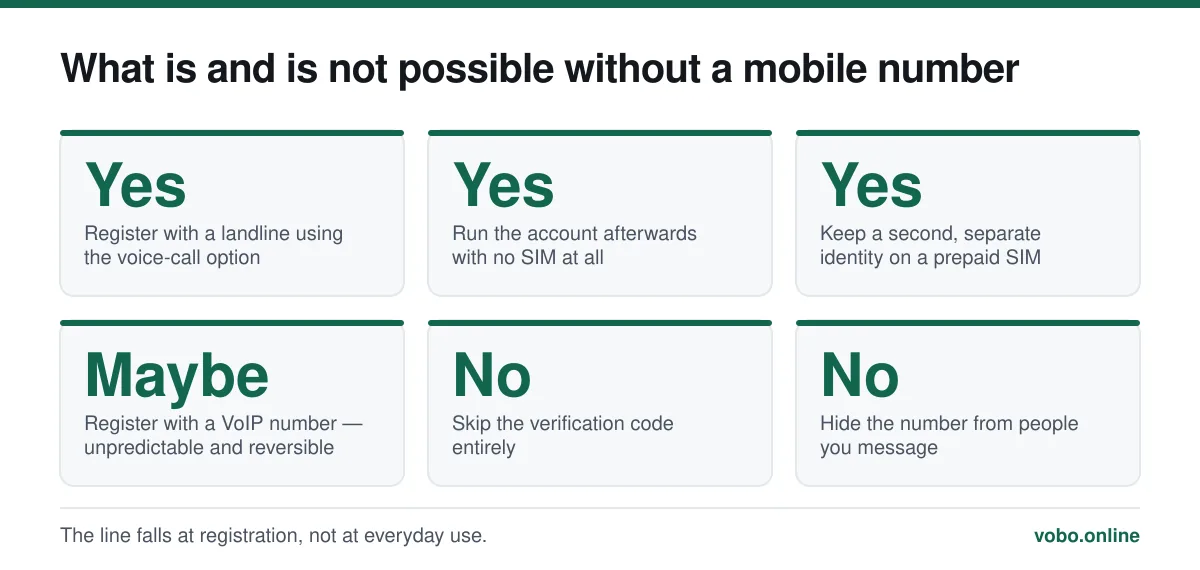
You cannot register without some number receiving a verification code, but it does not have to be your mobile. A landline works properly, because WhatsApp will read the code aloud over an automated call, and a spare prepaid SIM works too. VoIP numbers work sometimes and fail unpredictably, since WhatsApp blocks ranges it associates with bulk signups.
Key takeaways
- Verification cannot be skipped. Any site or app claiming otherwise is a scam or malware.
- A landline is the properly supported route: choose 'Call me' and an automated voice reads the six digits.
- After registration the SIM can be removed — a Wi-Fi-only device runs the account fine.
- A cheap prepaid SIM is the most reliable way to get a second, disposable WhatsApp identity.
What is actually being asked
People search this for three quite different reasons, and they have three different answers. It is worth working out which one you are.
- You have no mobile number at all — you use a landline, or a tablet with no cellular. There is a supported route for you, below.
- You want a WhatsApp account that is not tied to your personal number, for marketplace listings or public groups. A second SIM is the answer, and it is cheap.
- You want an untraceable, anonymous account. This is the one with the disappointing answer: WhatsApp is not built for it, and the workarounds that claim to deliver it mostly do not.
The underlying constraint is the same in all three cases. The phone number is the account identifier, not a contact detail attached to it. Why that is so is explained in does WhatsApp need a phone number.
The landline method, which properly works
This is not a trick. WhatsApp supports it deliberately, because plenty of small businesses register their landline.
Registering WhatsApp on a landline
- Install WhatsApp on the device you will useA phone with no SIM, a tablet, or an old handset all work. It needs Wi-Fi, nothing else.
- Enter the landline number in international formatCountry code, then the number without its leading zero. +1 for the US and Canada, +44 for the UK, +91 for India.
- Let the SMS attempt failWhatsApp tries a text first. A landline cannot receive one, so wait — the 'Call me' button only unlocks when the countdown finishes, usually about a minute.
- Tap 'Call me' and answer the landlineAn automated voice reads the six digits, twice, fairly quickly. Have a pen ready.
- Enter the code within a few minutesIt expires. If you miss it, you can request another call after the timer resets.
A second SIM: the reliable answer to a separate account
If what you want is a WhatsApp identity that is not your personal number, a prepaid SIM is the honest solution. It costs a few pounds or dollars, works permanently, needs no top-up in most countries to keep receiving texts, and never stops working the way a virtual number can.
On a modern phone you do not even need a second handset: an eSIM slot, or the multi-account feature in recent versions of WhatsApp, lets both accounts live on the same device. WhatsApp Business is a third route — a separate free app with a separate number.
| Approach | Reliability | Cost | Catch |
|---|---|---|---|
| Prepaid physical SIM | High | A few pounds or dollars | Needs a spare SIM slot or a second handset |
| eSIM from a data provider | High if it supports SMS | Varies | Many travel eSIMs are data-only and cannot receive the code |
| WhatsApp Business app | High | Free | Still needs its own separate number |
| Multi-account in WhatsApp | High | Free | Still needs a second number; not on every build yet |
| Google Voice or similar VoIP | Unpredictable | Free to low | Frequently refused; may be blocked later |
| Free 'receive SMS online' sites | Effectively zero | Free | Blocked ranges, and the number is public so anyone can take the account |
VoIP numbers, honestly assessed
This is where most articles on the subject overpromise, so here is the careful version. WhatsApp does not publish which number ranges it refuses. It clearly blocks a large set associated with bulk registration, because that is how spam accounts are created at scale. Which specific ranges are blocked changes over time and by country.
The practical result is that a VoIP number may register today and be refused tomorrow, and the same provider can work in one country and not another. Worse, an account registered on a virtual number can be lost if the provider recycles the number to somebody else — at which point they can register it and take the account, and you have no recourse.
Why free SMS-receiving sites are a trap
Public numbers on 'receive SMS free' websites fail for two independent reasons. WhatsApp blocks most of these ranges outright, so registration usually just refuses. And when it does succeed, the inbox is public: anybody can visit the same site, request a code for that number, and take your account. There is no security in an identifier the whole internet can read.
Life after registration: no SIM needed
Once the account exists, the number is only needed again if you re-register. You can take the SIM out, use the phone on Wi-Fi only, or run the account entirely from linked devices. The account survives.
That is how an old phone becomes a WhatsApp-only device, and how a tablet runs the service — covered in WhatsApp on a tablet. Up to four companion devices can be linked, and since 2023 they keep working when the primary phone is off.
The anonymity question
If the goal is that nobody you message can identify you, WhatsApp is the wrong tool and no workaround fixes it. Everyone you chat with sees the number you registered with, and every member of a group with you sees it too. A second SIM separates that number from your name, which is a genuine improvement, but it is not anonymity — the number still exists, was still bought somewhere, and still identifies one account.
For actual anonymity, Signal supports usernames that let people contact you without knowing your number, and Session requires no identifier at all. The trade is reach: the people you want to talk to are on WhatsApp, which is the whole reason this question gets asked. What can and cannot be hidden on WhatsApp itself is in how to hide your phone number.
Frequently asked questions
Can I use WhatsApp with just an email address?
No. Email can only be added afterwards as a recovery route for your two-step verification PIN. There is no email-based registration or login.
Does WhatsApp work on a tablet without a SIM?
Yes, in two ways: link it as a companion device to an existing account, or register it directly using a landline or borrowed number for the code. Either way the tablet itself needs no SIM afterwards.
What happens if my registered number gets recycled to someone else?
If they register WhatsApp on it, your account moves to them and you lose it — along with the chat history if you had no backup. This is the main practical risk of registering on a number you do not permanently control.
Can I keep my WhatsApp if I cancel my phone contract?
The account keeps working on the device it is on, because the SIM is not checked after registration. You will not be able to re-register that number later, so migrate to a new number with the Change Number tool before you cancel.
Sources
- How to register a phone number — WhatsApp Help CenterSupports: The supported registration paths, including the automated voice call that makes landline registration possible.
- About WhatsApp account registration — WhatsApp Help CenterSupports: That verification is mandatory and that re-registering a number moves the account away from the previous device.
Related reading
Setup and account
Does WhatsApp need a phone number? Yes, and here is why it is built that way
WhatsApp requires a phone number that can receive a code — there is no email or username signup. Here is what qualifies, what does not, and why.
Setup and account
What the WhatsApp 6-digit code is, and why nobody should ever ask you for it
The 6-digit code is WhatsApp's registration key for your phone number. Here is what it does, why it arrives unasked, and what to do when it never turns up.
Privacy and security
How to hide your phone number on WhatsApp — and what you actually can hide
You cannot hide your number from someone you message, but you can control almost everything else. Here is what works, what does not, and the second-number option.
Setup and account
Can you get WhatsApp on a Samsung tablet or an iPad?
Android tablets can run WhatsApp as a linked companion device. iPad has its own app now. Here is how each works and what the limits are.