How to change the language in WhatsApp on Android and iPhone
On Android, open WhatsApp Settings → Chats → App language and pick from the list. On iPhone there is no setting inside WhatsApp — go to the iOS Settings app, scroll to WhatsApp, tap Language and choose there. Either way it changes the interface only; it does not translate messages.
Key takeaways
- Android: Settings → Chats → App language. iPhone: iOS Settings → WhatsApp → Language.
- It changes the interface, not your messages. WhatsApp has no built-in translation.
- Setting it to 'Phone's language' follows the system and is the sensible default.
- Your keyboard language is separate and is controlled by the phone, not by WhatsApp.
Android
Changing the language on Android
- Open WhatsApp SettingsTap the three-dot menu at the top right, then Settings.
- Tap ChatsThe same screen that holds themes, wallpaper and chat backup.
- Tap 'App language'It sits near the top. Older versions label it 'App language' under Chats; some newer builds move it to Settings → App language directly.
- Choose a languageThe list is long — WhatsApp ships in more than sixty. 'Phone's language' follows the system setting and is the option to pick if you are unsure.
- The interface changes immediatelyNo restart is needed. If a few strings stay in the old language, close and reopen the app.
On Android 13 and later there is a second route through the operating system: Settings → Apps → WhatsApp → Language. Android's per-app language feature and WhatsApp's own setting do the same job, and setting either one is enough.
iPhone
There is no language setting inside WhatsApp on iOS, and people spend a long time looking for one. iOS handles per-app language itself.
Changing the language on iPhone
- Open the iOS Settings appThe grey gear icon on the home screen — not WhatsApp's own settings.
- Scroll down to WhatsAppApps are listed alphabetically toward the bottom of the Settings list.
- Tap LanguageThis shows the languages WhatsApp supports that are also configured on your phone.
- If the language you want is missingAdd it first at Settings → General → Language & Region → Preferred Languages → Add Language. It then appears in WhatsApp's per-app list.
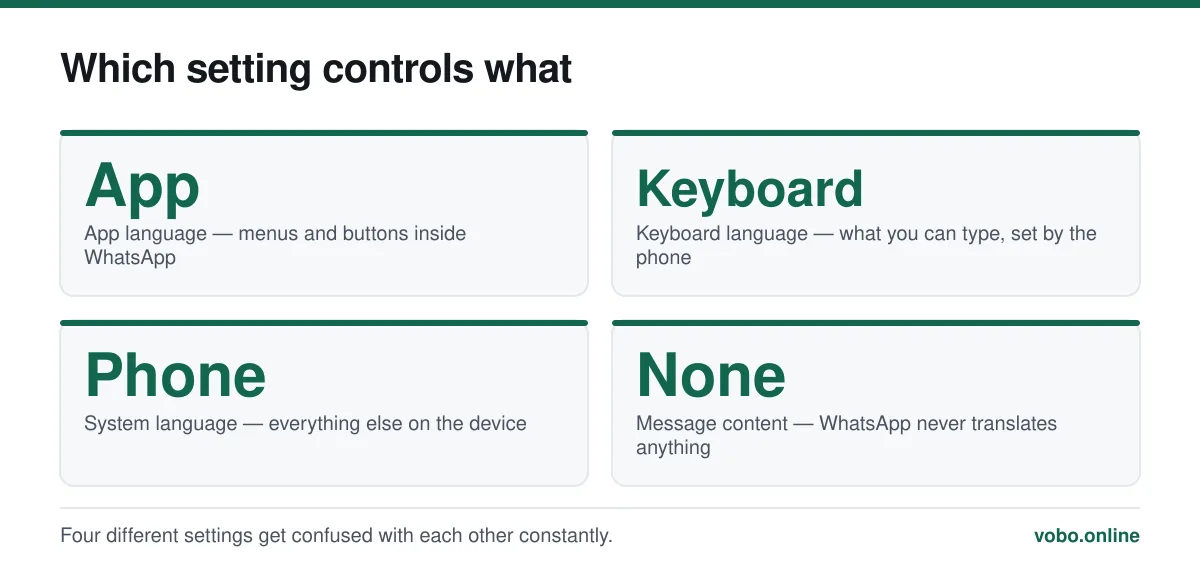
What the setting does not change
| Setting | Controls | Where it lives |
|---|---|---|
| App language | Menus, buttons and system messages in WhatsApp | WhatsApp Settings (Android) or iOS Settings (iPhone) |
| Keyboard language | What you can type, including scripts and autocorrect | The phone's keyboard settings |
| Message content | Nothing — messages arrive as written | Not controllable; WhatsApp does not translate |
| Contact names | Nothing — they come from your address book | Your phone's contacts app |
| Phone language | Everything else on the device | The phone's system settings |
The most common disappointment here is discovering that WhatsApp has no built-in translation. Messages arrive exactly as they were written, in whatever language the sender used, and no app setting changes that.
Reading messages in another language
Since WhatsApp does not translate, the practical routes are outside the app.
- Long-press a message, copy it, and paste it into a translation app or website. Reliable and works everywhere.
- On Android, some phones offer translation directly in the text-selection menu, which saves the copy and paste.
- iOS offers a system Translate action when you select text on recent versions.
- Some keyboards can translate as you type, which handles the outgoing direction.
Typing in another script
The keyboard is entirely separate from WhatsApp's language setting, and is where the actual work happens if you write in more than one language.
- Android: Settings → System → Languages & input → On-screen keyboard, then add languages to your keyboard. Switch with the globe key.
- iPhone: Settings → General → Keyboard → Keyboards → Add New Keyboard. Switch with the globe key.
- Both platforms let you keep multiple keyboards active and swap mid-message, which is how most bilingual users work.
- Voice notes sidestep the whole problem, which is one reason they are so heavily used in multilingual markets — a point that comes up in why people use WhatsApp.
When the setting will not stick
- Some strings stay in the old language — close and reopen WhatsApp. A few interface elements are cached until restart.
- The language is not in the list — WhatsApp supports a large but finite set. On iPhone, the language must also be added to the phone's preferred languages first.
- The whole phone changed language instead — you edited the system language rather than the per-app one. On iPhone the per-app setting is under WhatsApp specifically, not under General.
- The setting has moved — WhatsApp occasionally relocates it between Settings → Chats and the top level of Settings. Look in both.
- You cannot find it at all on iPhone — that is expected. It is not in WhatsApp; it is in iOS Settings.
If the app is misbehaving more broadly than a stubborn menu label, work through why WhatsApp is not working.
Frequently asked questions
How do I change the WhatsApp language on Android?
Open WhatsApp Settings → Chats → App language and choose from the list. On Android 13 and later you can also use Settings → Apps → WhatsApp → Language, which does the same thing.
Why is there no language setting in WhatsApp on my iPhone?
Because iOS handles per-app language itself. Go to the iOS Settings app, scroll to WhatsApp and tap Language. If the language you want is missing, add it first under General → Language & Region.
Does changing the WhatsApp language translate my messages?
No. It changes menus, buttons and system messages only. WhatsApp has no built-in translation, so messages arrive in whatever language the sender wrote them.
Can I use a different language in WhatsApp than on the rest of my phone?
Yes. Both platforms support a per-app language that differs from the system language — WhatsApp's own setting on Android, and iOS Settings → WhatsApp → Language on iPhone.
Sources
- How to change your app language — WhatsApp Help CenterSupports: The Android in-app language setting and that iPhone users change it through iOS Settings instead.
- How to update WhatsApp — WhatsApp Help CenterSupports: That only official store builds are supported, which is the basis for the warning about translation apps that modify the client.
Related reading
Troubleshooting
Why WhatsApp is not working, and how to fix it in order
An ordered triage for WhatsApp that will not open, connect, call or download — starting with the causes that are actually most common.
Troubleshooting
How to update WhatsApp on iPhone and Android
Updating WhatsApp goes through the App Store or Google Play. Here are the steps, how to automate it, and what to do when the update is refused.
Features explained
How WhatsApp works, from registration to read receipts
A complete plain-language guide to operating WhatsApp: setting up, sending messages, the tick system, calls, groups, backups and linked devices.

Setup and account
How to create a WhatsApp account, step by step
Setting up WhatsApp takes about three minutes. Here is the whole process on iPhone and Android, plus the two settings worth changing immediately.