How to unlock chats on WhatsApp, and how Chat Lock works
Locked chats live in a folder called Locked chats at the top of your chat list. Pull down on the chat list to reveal it, tap it, and authenticate with your fingerprint, face or device passcode. If you set a secret code, the folder is hidden entirely and you reveal it by typing that code into the chat search box.

Key takeaways
- Pull down on the chat list to reveal the Locked chats folder, then authenticate to open it.
- A secret code hides the folder completely — you type the code into search to bring it back.
- Locked chats do not show sender names or message previews in notifications.
- Chat Lock protects against someone holding your phone. It is not extra encryption.
What Chat Lock is for
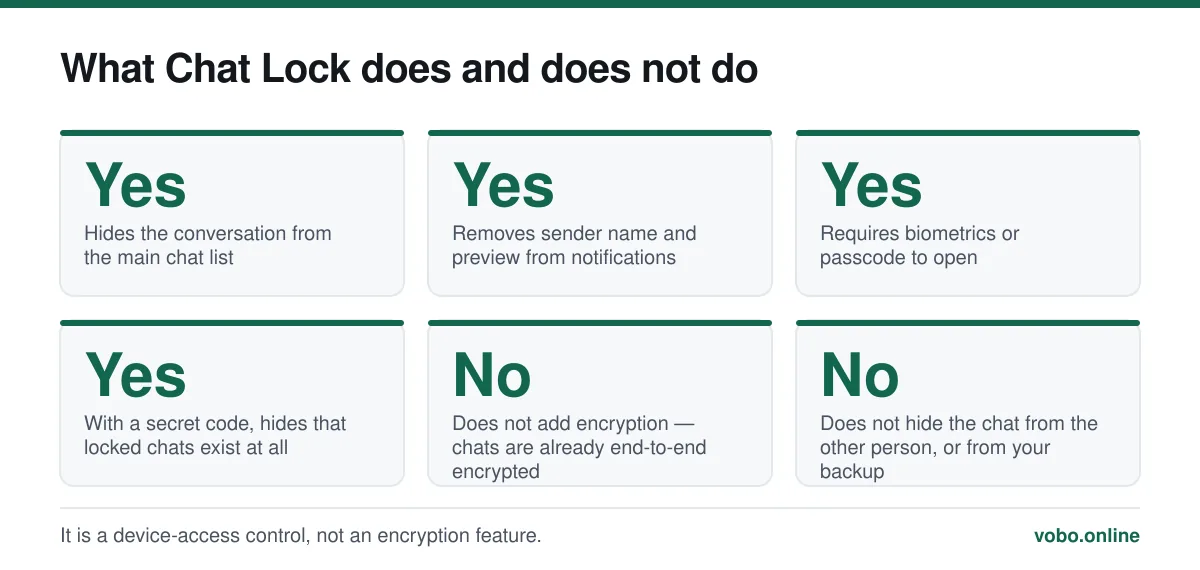
Chat Lock moves individual conversations into a separate folder that requires your fingerprint, face or device passcode to open. Their notifications stop showing the sender's name and the message text, so a chat cannot be read over your shoulder or by somebody who picks up an unlocked phone.
It is worth being precise about what it does not do. It adds no encryption — every personal chat is already end-to-end encrypted, and Chat Lock changes nothing about that. It protects against physical access to your device, which as it happens is the threat that actually materialises most often. The wider picture is in can WhatsApp be hacked.
Opening a locked chat
Unlocking
- Pull down on the chat listFrom the main Chats screen, swipe down from the top. The 'Locked chats' folder appears above the ordinary chats.
- Tap 'Locked chats'If you have set a secret code, this folder will not be there — skip to the secret code steps below.
- AuthenticateFingerprint, face, or your device passcode, depending on what the phone supports and what you set up.
- Open the chatThe folder shows all locked conversations. It relocks when you leave WhatsApp or after the screen turns off.
The secret code, which hides the folder entirely
A secret code goes a step further: the Locked chats folder disappears from the chat list altogether, so there is no visible sign that locked chats exist at all.
Using and setting a secret code
- To reveal a hidden folderType the secret code into the search box at the top of the chat list. The folder appears in the results. This is the only way in, so the code has to be memorable.
- To set oneOpen Locked chats → the three-dot or settings icon → Chat lock settings → Secret code. Choose a word or phrase rather than digits; it is typed into a search box, so text works well.
- To hide the folderIn the same settings screen, turn on 'Hide locked chats'. Available only once a secret code is set.
- If you forget the codeThere is no recovery. You have to remove Chat Lock from each affected conversation, which requires opening the folder — which requires the code. Write it down somewhere physical.
Locking a chat
- Open the conversation you want to lock.
- Tap the contact or group name at the top to open its info screen.
- Scroll to 'Chat lock' and turn it on.
- Authenticate. The chat moves to the Locked chats folder immediately.
You can lock individual chats and groups. Locking does not notify the other person and does not change anything on their side.
Turning Chat Lock off
Removing the lock from a chat
- Open the Locked chats folder and authenticatePull down on the chat list, or type your secret code into search if the folder is hidden.
- Open the chat and tap its nameThe same info screen you used to lock it.
- Turn off 'Chat lock'Authenticate once more to confirm. The chat returns to the main list with its history intact.
- Repeat for each locked chatThere is no bulk unlock. Each conversation is handled individually.
Locked chats on other devices
Chat Lock syncs to your linked devices, so a chat locked on your phone is also locked on a linked computer, where it requires that device's authentication.
This is worth checking rather than assuming, particularly if you linked a computer some time ago. A companion session that is still logged in has access to your account whether or not your phone is nearby, and auditing that list matters more than any single lock — see how to scan a WhatsApp QR code, which covers the linked-devices screen and the scam that abuses it.
Chat Lock versus App Lock
Two different features that are easy to confuse.
| Chat Lock | App Lock | |
|---|---|---|
| Scope | Individual chats you choose | The whole WhatsApp app |
| Where it is set | The chat's info screen | Settings → Privacy → App lock |
| Notifications | Sender and preview hidden for locked chats | Unchanged |
| Can hide that it exists | Yes, with a secret code | No |
| Good for | One sensitive conversation on a shared phone | Keeping the whole app closed to others |
They work together. App Lock keeps everybody out of WhatsApp; Chat Lock keeps a specific conversation out of view of somebody who is legitimately using your phone.
Frequently asked questions
Where are my locked chats on WhatsApp?
In a folder called Locked chats, revealed by pulling down on the main chat list. If you set a secret code and hid the folder, type that code into the chat search box instead.
What if I forget my WhatsApp secret code?
There is no recovery. Nobody can reset it, including WhatsApp support, because that would defeat the feature. The chats remain in the account but you cannot reach the folder without the code.
Does Chat Lock hide the chat from the other person?
No. Locking is entirely local to your device and your linked devices. The other person sees the conversation normally and is not notified of anything.
Does Chat Lock make a chat more encrypted?
No. Every personal chat is already end-to-end encrypted by default. Chat Lock controls who can open the conversation on your phone, which is a different problem — and, in practice, the more common one.
Sources
- About Chat Lock — WhatsApp Help CenterSupports: The Locked chats folder, the pull-down gesture, the secret code behaviour and that notifications hide sender and preview.
- About end-to-end encryption — WhatsApp Help CenterSupports: That chats are already end-to-end encrypted by default, so Chat Lock adds access control rather than encryption.
Related reading
Privacy and security
Is WhatsApp safe for sending private photos?
Encryption protects the photo in transit. It does nothing about backups, screenshots or the person receiving it — which is where the real risk sits.

Privacy and security
Can WhatsApp be hacked? What is actually possible, and what is marketing
Almost every 'WhatsApp hacking' claim is false. Here is what can genuinely compromise an account, how to spot it, and how to lock the account down.
Privacy and security
How to hide your phone number on WhatsApp — and what you actually can hide
You cannot hide your number from someone you message, but you can control almost everything else. Here is what works, what does not, and the second-number option.
Features explained
How to scan a WhatsApp QR code, and the scam that abuses it
WhatsApp uses QR codes for two different jobs: adding a contact and linking a device. Here is how to scan each, and why one of them is dangerous.