What does 'user defined' mean in WhatsApp?
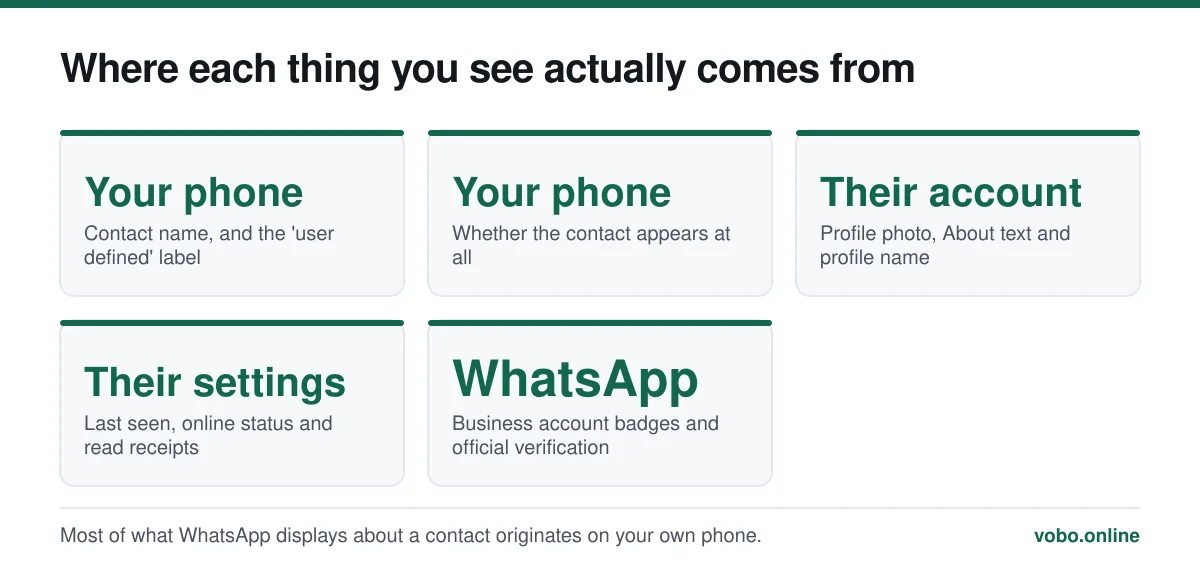
It is a contact label from your phone's address book, not something WhatsApp generated. When a number is saved under a custom label rather than one of the standard ones like Mobile, Home or Work, Android reports it as 'user defined', and WhatsApp displays whatever the phone tells it. It carries no meaning about the person and no meaning about your account.
Key takeaways
- It comes from Android's contacts system, not from WhatsApp. Nothing about the app produced it.
- It means the number was saved under a custom label instead of a standard one.
- It says nothing about the contact — not that they blocked you, not that they are a stranger.
- Fix it by editing the contact in your phone's contacts app and choosing a standard label.
Where the label comes from
Android's contacts system stores a type alongside every phone number: Mobile, Home, Work, Main, Fax and a handful of others. There is also an option to type your own label — 'Gran', 'Old number', 'Site office', anything at all.
Internally, Android records a custom label as type 'custom', which several interfaces render as "user defined". WhatsApp reads the contact and displays the label it is given. So the phrase originates in your phone's address book, and WhatsApp is simply repeating it.
This is the same mechanism that makes WhatsApp show the name you saved rather than the person's own profile name — the app mirrors your address book rather than keeping its own. That behaviour, and its consequences, are described in how to add a contact in WhatsApp.
How a contact ends up with it
- You, or somebody using your phone, typed a custom label when saving the number.
- The contact came from an import — a SIM transfer, a backup restore, or a sync from another service — where the original label did not map onto Android's standard set.
- A third-party app created the contact and used a label of its own.
- The number arrived on a contact card shared by somebody else, carrying their labelling with it.
The second one accounts for most cases. Migrating between phones, or importing contacts from an old account, produces these in bulk — which is why people often notice several at once rather than one.
What people think it means, and why they are wrong
| What people assume | Actually |
|---|---|
| They have blocked me | Blocking is invisible and produces no label anywhere. See our piece on blocked numbers |
| This contact is not saved | The opposite — it is saved, with a custom label |
| It is a business or verified account | Business accounts are marked separately, as a business profile |
| WhatsApp flagged this number | WhatsApp did not generate the label at all |
| The number is fake or a bot | Nothing about the label speaks to who owns the number |
The genuine signals about a contact are elsewhere entirely: a missing profile photo, an absent last seen, a message stuck on one tick. Those are ambiguous too, and what each does and does not prove is covered in what 'online' means on WhatsApp.
Changing it
Replacing a custom label with a standard one
- Open your phone's Contacts appNot WhatsApp — the label lives in the address book, so it has to be edited there.
- Find the contact and tap EditThe pencil icon on most Android builds.
- Tap the label beside the phone numberIt will read 'user defined', 'custom', or whatever text was entered.
- Choose a standard labelMobile is the right choice for a WhatsApp number in almost every case.
- Save, then check WhatsAppThe change appears within a few seconds. If it does not, pull down on WhatsApp's contact list to force a re-sync.
If several contacts have it at once
That points to an import rather than to anything you did deliberately. Two things are worth doing.
- Merge duplicates. Most contacts apps have a 'Merge & fix' or 'Duplicates' tool that consolidates entries created by overlapping syncs.
- Check which account contacts are saved to. A contact stored on the SIM or in a non-syncing account may show odd labels — or not appear in WhatsApp at all, which is a much more common complaint and is covered in how to add a contact.
Or leave it alone
Nothing breaks. Messages send and arrive normally, calls work, and the contact behaves exactly like any other. The label is cosmetic, and if you have a hundred imported contacts carrying it, cleaning them all up is optional work rather than a fix for a problem.
The one case where it is worth tidying is when the custom label is genuinely wrong or confusing — an 'old number' label on a number that is now current, for instance, which will mislead you later.
Frequently asked questions
What does 'user defined' mean on WhatsApp?
It is a contact label from your phone's address book, indicating that the number was saved under a custom label rather than a standard one like Mobile or Home. WhatsApp is displaying what the phone told it, and the label carries no meaning about the contact.
Does 'user defined' mean someone blocked me?
No. Blocking on WhatsApp is entirely invisible and produces no label anywhere in the interface. The two are unrelated.
How do I remove the 'user defined' label?
Edit the contact in your phone's Contacts app, tap the label beside the phone number, and choose a standard one such as Mobile. WhatsApp picks up the change within seconds.
Why do lots of my contacts say 'user defined'?
Almost always because they were imported — from a SIM, a backup, or a sync from another service — with labels that did not map onto Android's standard set. Merging duplicates in the contacts app usually cleans up most of them at once.
Sources
- How to add a contact — WhatsApp Help CenterSupports: That WhatsApp reads contact details, including labels, from the device's address book rather than storing its own.
- About blocking and reporting contacts — WhatsApp Help CenterSupports: That blocking produces no visible indication to the blocked contact, which rules out the most common misreading of this label.
Related reading
Setup and account
How to add a contact in WhatsApp, four different ways
Add someone from inside WhatsApp, from your phone book, by QR code, or message them without saving them at all. Plus why a contact fails to appear.
Setup and account
How to change your name on WhatsApp, and who actually sees it
Changing your WhatsApp name takes four taps, but only some people ever see it. Here are the steps and which name each person is shown.
Features explained
What 'online', 'last seen' and popup notifications actually mean
WhatsApp's status indicators get over-read constantly. Here is what each one genuinely proves, and what it does not.
Privacy and security
How to see your blocked numbers on WhatsApp, and what blocking does
Your block list is at Settings → Privacy → Blocked contacts. Here is what blocking hides, what it does not, and what happens when you unblock.