How to remove WhatsApp from Facebook, and what it actually achieves
If your WhatsApp is connected to a Meta Accounts Center alongside Facebook or Instagram, open Settings → Accounts Center, select WhatsApp and remove it. That severs the account-level link used for shared logins and cross-posting. It does not stop the platform-level data sharing described in WhatsApp's privacy policy, which is a condition of using the service at all.
Key takeaways
- Accounts Center linking is optional and reversible. Platform data sharing is neither.
- Unlinking stops cross-posting, shared logins and cross-app personalisation signals.
- Message content was never shared — it is end-to-end encrypted and Meta cannot read it.
- Metadata sharing between WhatsApp and Meta continues regardless of the link.
There are two connections, not one
Almost every confused conversation about this topic comes from treating these as the same thing. They are not, and only one of them is under your control.
| Accounts Center link | Platform data sharing | |
|---|---|---|
| What it is | You choosing to connect your accounts | WhatsApp sharing account data with Meta companies |
| Optional? | Yes, entirely | No — it is a condition of using WhatsApp |
| Reversible? | Yes, in a few taps | No |
| What it enables | Shared logins, cross-posting status to Facebook stories | Infrastructure, safety, and in some regions ad-related signals |
| Covers message content? | No | No — content is end-to-end encrypted |
Removing the Accounts Center link
Unlinking
- Open WhatsApp SettingsAndroid: three-dot menu → Settings. iPhone: the Settings tab.
- Tap 'Accounts Center'It appears only if a link exists. If there is no such entry, your WhatsApp is not connected and there is nothing to remove.
- Select your WhatsApp profile in the listThe Accounts Center shows every connected profile — Facebook, Instagram and WhatsApp.
- Choose 'Remove from Accounts Center'Confirm. Cross-posting and shared login stop immediately.
- Check the other side tooThe same Accounts Center is reachable from Facebook and Instagram settings, and it is worth confirming the change appears there.
What unlinking actually stops
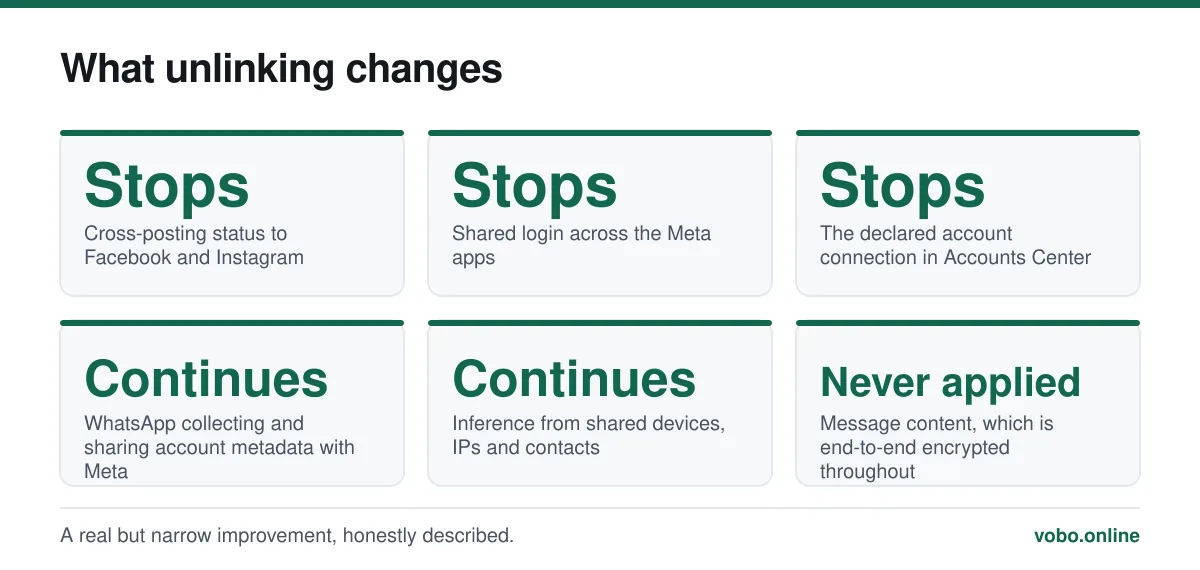
- Cross-posting your WhatsApp status to Facebook or Instagram stories.
- Using one login across the apps, and the single-sign-in convenience that comes with it.
- Some cross-app personalisation signals that depend on knowing the accounts are the same person.
- Your WhatsApp appearing in the Accounts Center list alongside your other profiles.
What continues regardless
This is the part usually left out, and leaving it out is how people end up believing they have achieved more than they have.
- WhatsApp continues to collect the data described in its privacy policy: your phone number, device and connection information, usage patterns, and profile details.
- That data continues to be shared with Meta for stated purposes including infrastructure, security and product improvement. This has been the case since the 2016 policy change and is not optional.
- Meta can still infer a connection between your accounts through other signals — a shared device, a shared IP address, an overlapping contact graph. Unlinking removes the declared connection, not every inferable one.
- None of this concerns message content, which is end-to-end encrypted and unreadable to Meta whether you link anything or not.
Where the concern comes from
WhatsApp launched with an explicitly minimal data position and no advertising. After the 2014 acquisition, a 2016 privacy policy change began sharing some account information with Facebook, including for ad targeting on Facebook itself. Existing users got a 30-day window to opt out of part of it; new users were never offered that choice, and the opt-out has not returned.
European regulators objected, and sharing for advertising purposes was suspended in the EU. A further policy update in 2021 caused a much larger reaction that was substantially based on a misreading — it concerned messages to business accounts rather than personal chats, and did not alter encryption — but WhatsApp handled the announcement poorly enough that millions installed Signal and Telegram anyway.
If you want to go further
Unlinking is the only lever WhatsApp gives you over the connection itself. The remaining options are about limiting what is collected in the first place.
- Set your privacy controls deliberately — profile photo, About, last seen and group additions. The full pass is in how to hide your phone number on WhatsApp.
- Turn on end-to-end encrypted backups, so your history is not sitting in iCloud or Google Drive on that account's security.
- Request your account information: Settings → Account → Request account info. It shows what WhatsApp holds about you, which is more informative than most speculation about it.
- If the ownership itself is the objection, the alternatives differ in exactly the relevant way — Signal is run by a non-profit and holds famously little metadata. The trade is reach, discussed in why people use WhatsApp.
What none of this touches is message content, which was never the exposure. That distinction runs through every privacy question about the platform and is set out in can WhatsApp be hacked.
Frequently asked questions
Does deleting Facebook delete my WhatsApp?
No. They are separate accounts with separate identifiers — WhatsApp is tied to your phone number, Facebook to its own login. Deleting one leaves the other running normally.
Can Facebook see my WhatsApp messages?
No. Personal messages are end-to-end encrypted and Meta's servers relay data they cannot decrypt. What is shared is metadata — your number, device details and usage patterns — not the content of what you write.
How do I stop WhatsApp sharing data with Meta?
You cannot, beyond unlinking the optional Accounts Center connection. The platform-level sharing described in the privacy policy is a condition of using the service. The only complete opt-out is not using WhatsApp.
Why is there no Accounts Center option in my WhatsApp?
Because your WhatsApp is not linked to a Meta Accounts Center. The entry only appears once a link exists, so its absence means there is nothing to remove.
Sources
- WhatsApp Privacy Policy — WhatsApp LLCSupports: What account information WhatsApp collects and shares with other Meta companies, and that message content is excluded from it.
- Meta company information — MetaSupports: That WhatsApp, Facebook and Instagram are all Meta products, which is the basis for the Accounts Center connection.
- Meta transparency policies — MetaSupports: Meta's published policy documentation covering data handling across its family of apps.
Related reading
Privacy and security
Who owns WhatsApp, and what that ownership actually means for you
Meta Platforms has owned WhatsApp since 2014, when Facebook paid about $19 billion for it. Here is how that happened and what changed for users afterwards.
Privacy and security
How to hide your phone number on WhatsApp — and what you actually can hide
You cannot hide your number from someone you message, but you can control almost everything else. Here is what works, what does not, and the second-number option.
Privacy and security
Can WhatsApp be hacked? What is actually possible, and what is marketing
Almost every 'WhatsApp hacking' claim is false. Here is what can genuinely compromise an account, how to spot it, and how to lock the account down.
Features explained
Why do people use WhatsApp, and why not everywhere?
WhatsApp is dominant across Europe, India and Latin America and marginal in the US. The reason is SMS pricing history, not features.